

Here’s a truth many people don’t want to hear: your web hosting can make or break your website.
Most beginners spend all their time designing pages and almost no time choosing a best webhost, but that’s a big mistake. A slow or unreliable host can chase visitors away before they even see your site.
Studies show that over 50% of users leave a website if it takes more than 3 seconds to load, and even a 1-second delay can drop conversions by up to 7%. That means the wrong hosting service can literally cost you traffic, customers, and money.
The good news?
Choosing the right web hosting doesn’t have to be hard.
Let’s explore how you can select the best web hosting service based on your website’s needs.
TL;DR
- Know your website’s needs by identifying its type, traffic, CMS, storage, and future growth.
- Choose the right hosting type, whether Shared, VPS, Dedicated, Cloud, or Managed.
- Focus on performance by ensuring fast servers, high uptime, and strong security.
- Check customer support with 24/7 assistance, backups, and scalability options.
- Watch costs carefully by comparing prices, renewal rates, and hidden fees.
Understand Your Website’s Needs
Knowing what your website truly requires is the first step to choosing the right hosting. This helps you avoid paying for unnecessary features or picking a plan that can’t handle your growth.
Consider the following:
- Identify your website type: Blogs and portfolios need less power, while e-commerce or SaaS platforms need stronger hosting.
- Estimate your traffic: Low traffic may be fine on a basic plan, but higher traffic requires more robust resources.
- Consider technical requirements: Ensure compatibility with WordPress, Shopify, databases, email hosting, or other tools.
- Plan for future growth: Choose hosting that allows easy upgrades and resource scaling.
- Avoid overspending: Pick a plan that fits your needs now and can expand as your site grows.
Types of Web Hosting Explained
Choosing the right type of hosting is important because each option offers different levels of performance, security, and control. Understanding these basic hosting types will help you pick the one that best matches your website’s size, traffic, and technical needs.
1. Shared Hosting

Shared hosting means your website is placed on a server along with many other websites. All sites use the same resources such as storage, bandwidth, and processing power. This makes it the most affordable entry-level hosting option.
Pros
- It is very affordable, making it a great choice for beginners or small websites.
- It is extremely easy to use, even for people with no technical experience.
Cons
- Your website has limited resources because they are shared with many other users.
- You have very little control over server settings or advanced configurations.
Best For
Shared hosting is best for beginners, personal blogs, hobby sites, portfolios, and small business websites that don’t expect a lot of traffic. It is a perfect starting point for anyone who wants an easy and low-cost way to launch a website without dealing with technical tasks.
2. VPS (Virtual Private Server) Hosting
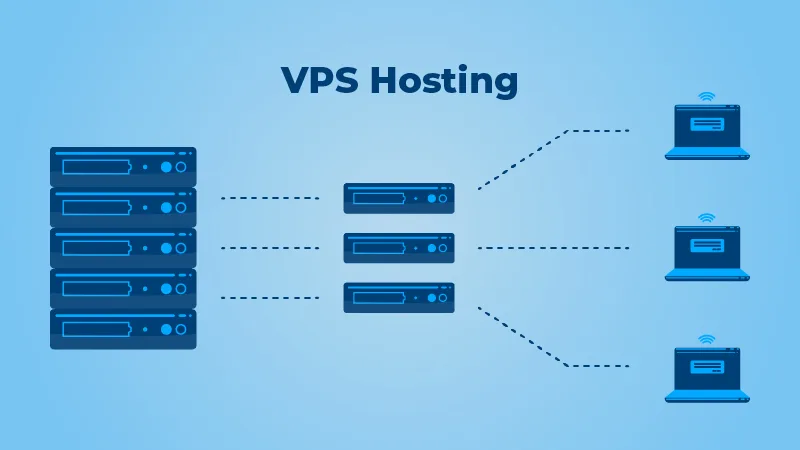
VPS hosting divides a physical server into multiple virtual servers. Each website gets its own dedicated portion of resources, offering more power and stability compared to shared hosting
Pros
- It provides dedicated resources, so your website gets more consistent performance.
- It can be easily scaled up as your website grows and needs more power.
Cons
- It can be more technical to manage, especially for beginners without server experience.
- It costs more than shared hosting, which may not suit very small or casual websites.
Best For
VPS hosting is ideal for growing websites, medium-to-high traffic blogs, e-commerce stores, and business sites that need more speed, stability, and control than what shared hosting can provide. It’s a great middle ground between affordable and powerful hosting.
3. Dedicated Hosting
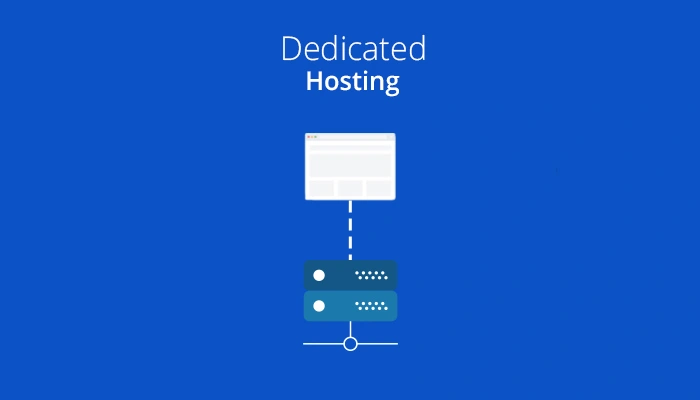
Dedicated hosting gives you an entire physical server for your website alone. You do not share resources with anyone, offering maximum performance, security, and control.
Pros
- It provides the highest level of performance because all server resources belong to your site.
- It offers excellent security, making it suitable for sensitive or high-traffic websites.
Cons
- It is significantly more expensive than other hosting types.
- It requires technical or server management skills to operate effectively.
Best For
Dedicated hosting is best for large enterprises, high-traffic websites, mission-critical applications, and businesses that need full customization and top-tier performance. It is ideal for websites where speed, reliability, and security are top priorities.
4. Cloud Hosting
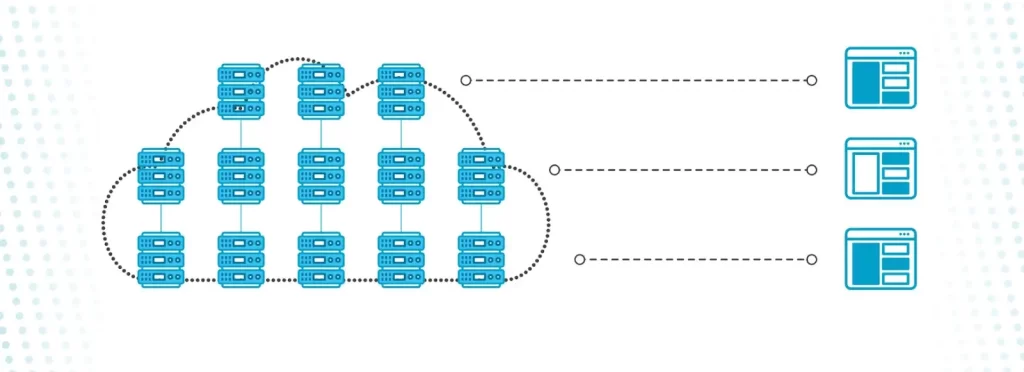
Cloud hosting uses multiple connected servers to host your website. Instead of relying on one physical server, your site pulls resources from a cloud network, providing better stability and flexibility.
Pros
- It is highly scalable, allowing you to increase or decrease resources instantly as needed.
- It follows a pay-as-you-go pricing model, so you only pay for the resources you actually use.
Cons
- Pricing can be unpredictable if your traffic suddenly increases.
- It sometimes requires technical skills to take full advantage of its features.
Best For
Cloud hosting is perfect for startups, growing businesses, apps, and websites with unpredictable or fluctuating traffic. It’s also great for sites that need high uptime and the ability to scale quickly without downtime.
5. Managed Hosting

Managed hosting is a service where the hosting provider handles all technical tasks for you. This includes updates, security, backups, performance optimization, and troubleshooting. Common types include Managed WordPress Hosting, Managed WooCommerce Hosting, Managed Cloud Hosting, and Managed VPS Hosting.
Pros
- It offers enhanced security features and regular monitoring to protect your site.
- It includes expert support, often specialized for platforms like WordPress.
Cons
- It is more expensive than standard hosting plans due to the added services.
- It offers less control over server settings and custom configurations.
Best For
Managed hosting is best for users who want a hassle-free experience without dealing with technical details. It’s ideal for business owners, bloggers, and anyone using WordPress who wants fast performance, strong security, and expert support while focusing on content instead of maintenance.
Key Factors to Consider When Choosing a Web Hosting Service
Choosing the right web host ensures your website stays fast, secure, and reliable.
1. Performance & Speed
Your website’s loading speed impacts user experience and search rankings.
Here are some key things to remember:
- Fast websites keep visitors happy and reduce bounce rates.
- SSD or NVMe storage makes data read/write much quicker.
- A CDN delivers content from servers near your users.
- Server-side caching speeds up repeated visits.
- Modern servers like LiteSpeed or Nginx handle traffic efficiently.
2. Uptime Reliability
Reliable uptime ensures your website is always accessible to visitors.
Here are some key things to remember:
- High uptime keeps your site accessible to visitors.
- Look for at least 99.9% uptime guarantees.
- Downtime can hurt your business reputation.
- Service Level Agreements (SLA) provide compensation for downtime.
- Reliable uptime helps maintain SEO rankings.
3. Security Features
Strong security protects your website, data, and visitors from threats.
Here are some key things to remember:
- SSL certificates protect user data and improve trust.
- Firewalls block harmful traffic before it reaches your site.
- DDoS protection prevents large-scale attacks.
- Regular backups protect against accidental data loss.
- Malware scanning and server patching keep your site secure.
Read: How to Secure a WordPress Website?
4. Scalability & Flexibility
Your hosting should adapt as your website grows and traffic increases.
Here are some key things to remember:
- Your hosting should grow with your website.
- Increase RAM, CPU, or storage without downtime.
- Cloud hosting often offers auto-scaling for traffic spikes.
- Flexible plans prevent costly migrations later.
- Scalability ensures smooth performance as traffic grows.
5. Customer Support
Responsive support helps you solve problems quickly, keeping your site running smoothly.
Here are some key things to remember:
- 24/7 support helps resolve issues quickly.
- Multiple contact channels make support easy to reach.
- A knowledge base aids in troubleshooting on your own.
- Experienced staff handle both basic and complex problems.
- Fast support reduces website downtime and frustration.
6. Pricing & Renewal Costs
Transparent pricing prevents unexpected costs and helps you choose the right plan.
Here are some key things to remember:
- Compare introductory and renewal prices carefully.
- Check what features are included or cost extra.
- Look for flexible billing (monthly or yearly).
- Money-back guarantees protect you if unsatisfied.
- Avoid hidden fees for backups, SSL, or email services.
7. Server Location
Choosing the right server location improves site speed and user experience.
Here are some key things to remember:
- Choose servers near your target audience for faster loading.
- Physical distance affects latency and page speed.
- Multiple server locations improve global access.
- A local server can boost SEO for your region.
- Faster access improves overall user experience.
8. Ease of Use
A user-friendly hosting platform makes website management simple, even for beginners.
Here are some key things to remember:
- User-friendly dashboards simplify website management.
- cPanel and Plesk make admin tasks easier.
- One-click CMS installation saves time.
- Intuitive tools reduce the learning curve for beginners.
- Easy management lets you focus on growing your site.
9. Backup & Restore Options
Reliable backups protect your website from data loss and allow quick recovery.
Here are some key things to remember:
- Automated backups save your website regularly.
- Manual backups give you full control over data.
- Easy restore ensures quick recovery from issues.
- Frequent backups protect against errors or malware.
- Backup retention duration matters for long-term safety.
Additional Expert Tips
Choosing the right web hosting involves more than just price; consider performance, security, support, and scalability to keep your website running smoothly.
To get the best website hosting, you must:
- Use Hosts With Staging Environments: A staging site lets you safely test changes before going live, helping you avoid bugs, downtime, and design mistakes.
- Check Real Reviews and Reputation: Look for long-term user feedback on uptime, speed, and customer support. A reliable track record means fewer headaches later.
- Watch Out for Hidden Fees: Avoid hosts that charge extra for essentials like SSL, backups, or email. Transparent pricing saves money and stress.
- Plan for Scalability: Choose a host that lets you upgrade resources easily as your traffic grows. This prevents costly and time-consuming migrations later.
- Consider Eco-Friendly Hosting: Green hosting uses renewable energy or energy-efficient data centers, reducing environmental impact and appealing to sustainability-minded users.
Common Mistakes to Avoid While Selecting Web Hosting
Avoid these common pitfalls to ensure your website runs smoothly and grows without unnecessary hassles.
- Choosing Only the Cheapest Option: The lowest price often means slow performance, limited features, or poor support. Don’t sacrifice quality just to save a few dollars.
- Ignoring Future Growth: If your site grows, you’ll need more resources. Picking a host without easy upgrades may force a stressful migration later.
- Not Checking Renewal Rates or Hidden Fees: Intro prices can jump dramatically at renewal. Some hosts also charge extra for basics like SSL or backups. Always read the fine print.
- Overlooking Security and Backups: A host without SSL, firewalls, or regular backups puts your site at risk. Strong security and easy restore tools are essential.
- Skipping Research on Customer Support: Poor support can turn small problems into big ones. Check reviews for response times, expertise, and available support channels.
How to Evaluate & Compare Hosting Providers?
Effectively compare hosts so you can pick the one that best fits your website’s needs and goals. To do so:
- Make a Shortlist Based on Your Needs: Identify your website’s requirements—traffic, storage, security, and special features. Create a shortlist of hosts that actually meet those needs so you’re only comparing relevant options.
- Compare Features and Performance: Check each host’s feature list: storage type, bandwidth, SSL, backups, staging, and control panel. Then compare performance metrics like uptime, server speed, and scalability to see which provider offers the best value.
- Test Using Free Trials or Money-Back Guarantees: Take advantage of trials to check real-world performance, ease of use, reliability, and support. Hands-on testing often reveals details you won’t see in marketing pages.
- Read User Reviews and Expert Ratings: Look at customer feedback and expert evaluations to learn about uptime, support quality, hidden fees, and overall reliability. Reviews help confirm which hosts truly deliver on their claims.
Recommended Hosting Providers
Here are some top hosting providers:
1. Best for Beginners
- Hostinger: Budget-friendly, intuitive control panel, fast SSD storage, and beginner-friendly setup.
- ChemiCloud: Easy-to-use interface, one-click app installations, responsive customer support, and reliable performance for new users.
Both hosts make it simple for first-time website owners to get online quickly without deep technical knowledge.
2. Best for WordPress
- Bluehost: Easy 1-click WordPress install, simple UI, and strong customer support.
- WP Engine: Premium managed WordPress hosting, high speed, enhanced security, and developer-focused tools.
These hosts are designed for WordPress, providing performance, reliability, and management tools that simplify site administration.
3. Best for E-Commerce
- UltaHost: Optimized for online stores, secure payment options, fast loading times, and reliable uptime for e-commerce sites.
- Exabytes: Managed WooCommerce hosting with SSD speed, secure payments, daily backups, and scalable features for growing online stores.
These providers offer performance, security, and scalability tailored for online shops, with features that protect data and enhance user experience.
4. Best for Cloud Scalability
- Cloudways: Managed cloud hosting across providers like DigitalOcean, AWS, and Google Cloud with auto-scaling and pay-as-you-go pricing.
Perfect for growing websites, applications, or businesses that need flexibility, high uptime, and scalable resources without managing infrastructure directly.
Final Thoughts: What’s The Best Web Hosting Service for Your Needs?
Choosing the right web hosting service is one of the most important decisions for your website’s success. The right host not only ensures your site runs smoothly and loads quickly, but it also provides essential security, reliable backups, scalability for future growth, and responsive customer support.
Remember, the cheapest option isn’t always the best. Focus on a balance between cost, features, and reliability to ensure your website remains fast, secure, and professional. Additionally, testing providers through free trials, reading reviews, and comparing options helps you make a confident choice.
For expert guidance and affordable hosting deals, visit HostingCharges.in for personalized recommendations.
FAQs
Performance and reliability. A fast, stable host ensures your website loads quickly and stays online.
Choose based on your website size, traffic, and technical needs—small sites can start with shared hosting, while growing or complex sites may need VPS, cloud, or dedicated hosting.
Yes. Picking a server near your audience improves loading speed and overall user experience.
It depends on your needs. Basic plans are cheap, but check renewal prices and hidden fees before choosing.
Absolutely. SSL, firewalls, malware scans, and backups protect your data and keep your site safe.
Use free trials or money-back guarantees to check speed, usability, and support quality.