
Imagine you ’ve got a great idea for a blog, an online store, or a personal portfolio—but every time you look up ‘how to create a website,’ you’re bombarded with technical jargon, endless setups, and confusing steps. It feels impossible.
What if I told you that by tonight, you could have a fully functional WordPress site live—without writing a single line of code? That’s exactly what StellarSites promises.
In this guide, I’ll take you step by step through the process of building your first website with StellarSites, explaining every concept in simple language. By the end, you’ll be confident enough to launch a website that looks professional and performs smoothly.
What is WordPress and Why Do Beginners Love It?
WordPress is the engine that runs millions of websites you visit every day. WordPress runs everything from small personal blogs to big brands like TechCrunch.
Why has it become so popular? It requires no coding knowledge to use, and it is both free and customizable. This feature is a huge help for beginners.
You can make pages, write posts, and design your site without having to write any code. There are thousands of themes and plugins to choose from, so it’s like having a box of ready-made tools that let you build anything from a simple blog to a full-fledged online store.
The WordPress Promise vs. The Beginner’s Problem
With over 40% of the internet, WordPress stands as the undisputed leader among web builder platforms. Yet setting up a WordPress website has typically involved a number of technical hurdles.
What challenges might beginners encounter?
- Web hosting: Finding a great web hosting provider (the location in which your site will reside) and setting it up.
- Installation: Installing the WordPress software manually on your web server is literally tedious.
- Hosting Connection: Connecting your domain name together with your web hosting (for example, yourbusiness.com).
- Theme Selection & Setup: selecting and setting up a design template.
- Managing a sea of plugins: Navigating through a sea of plugins for crucial features such as contact forms, security, and SEO.
- Site Performance Optimization: Making sure your website loads rapidly and that site visitors are not leaving your website when it is their turn to leave.
Read: 9 Practical Tips and Hacks to Speed up your WordPress Site
Every step could become a maze of technical jargon and potential errors. This is exactly the gap StellarSites fills.
What is StellarSites and How Does It Simplify WordPress?

StellarSites solves this problem by acting as your website-building assistant. It comes with built-in hosting, pre-configured WordPress, and automatic updates so you never have to worry about the technical side of things.
In short, it lets you focus on creating your site, not wrestling with server settings.
Why WordPress + StellarSites is the Very Best Combo for Beginners
StellarSites functions as a companion to your site-building hustle, taking care of almost all of the technical details. Here are a few reasons why it is so popular among beginners:
- One-Click Setup: No jargon-filled installations or file transfers.
- Pre-Designed WordPress Themes: Just choose a theme you like and go.
- No more worries regarding hacking or maintenance: With Automatic Security and Updates.
- Drag-and-Drop Editing: Visually Create gorgeous pages by using drag-and-drop Editing.
- Blazing Fast and Reliable: Not only hosting but also optimization is taken care of.
It is essentially a plug-and-play WordPress experience, with all the bells and whistles taken care of.
Now that you know why StellarSites is the easiest path for beginners, let’s break it down step by step. In the next section, I’ll walk you through everything—from signing up to publishing your site—without any confusing tech talk.
Step 1: Sign Up on StellarSites
- Go to the StellarSites website.
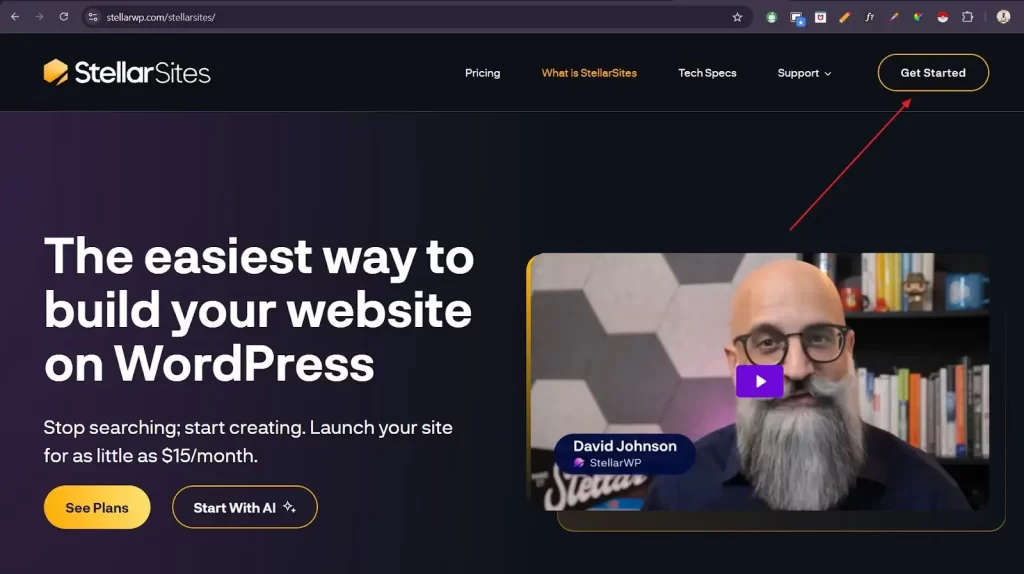
- Click on “Get Started”.
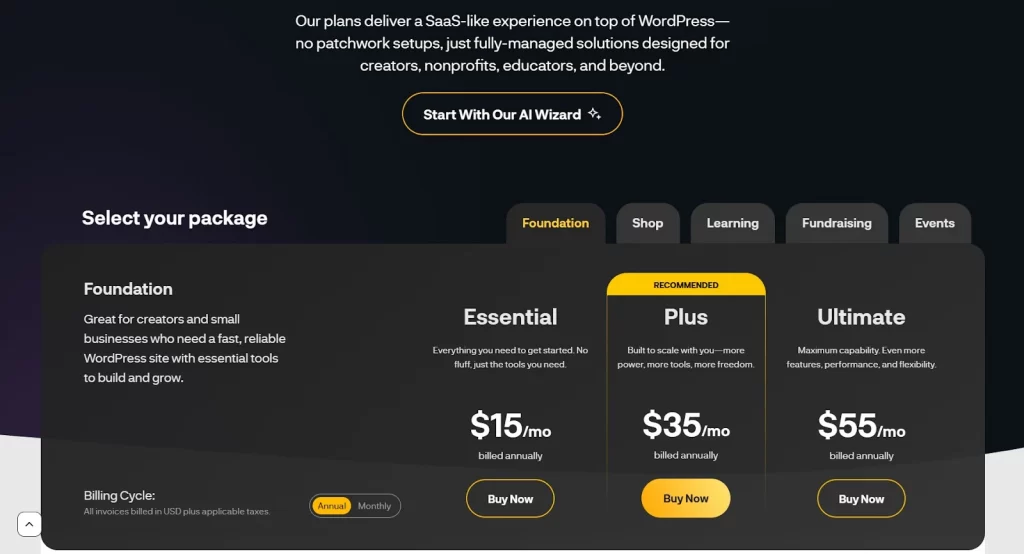
- Choose your plan – StellarSites usually offers beginner-friendly packages. Pick one that suits your needs and use cases (start with the Essential plan if you are new).
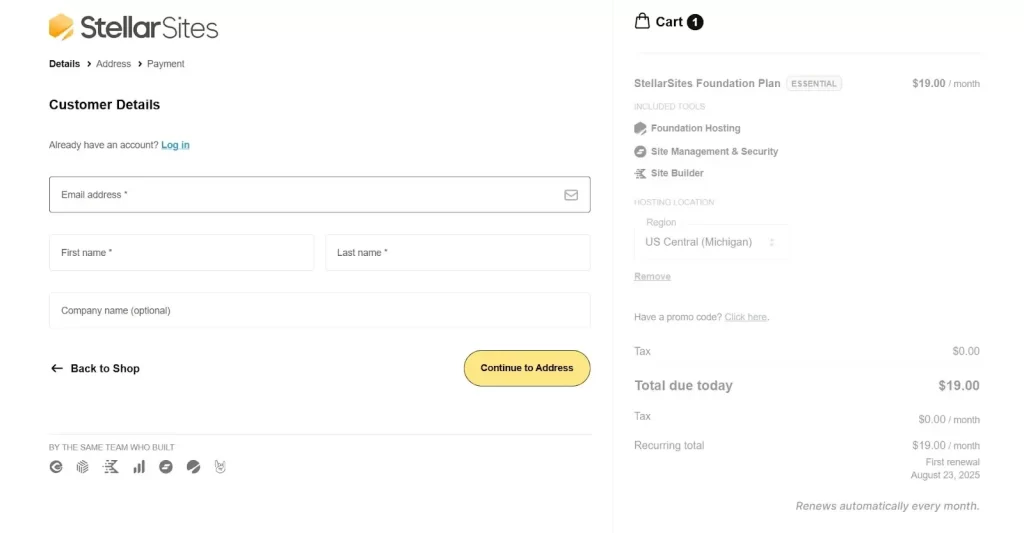
- Create your account by entering your name, email, company name and other details.
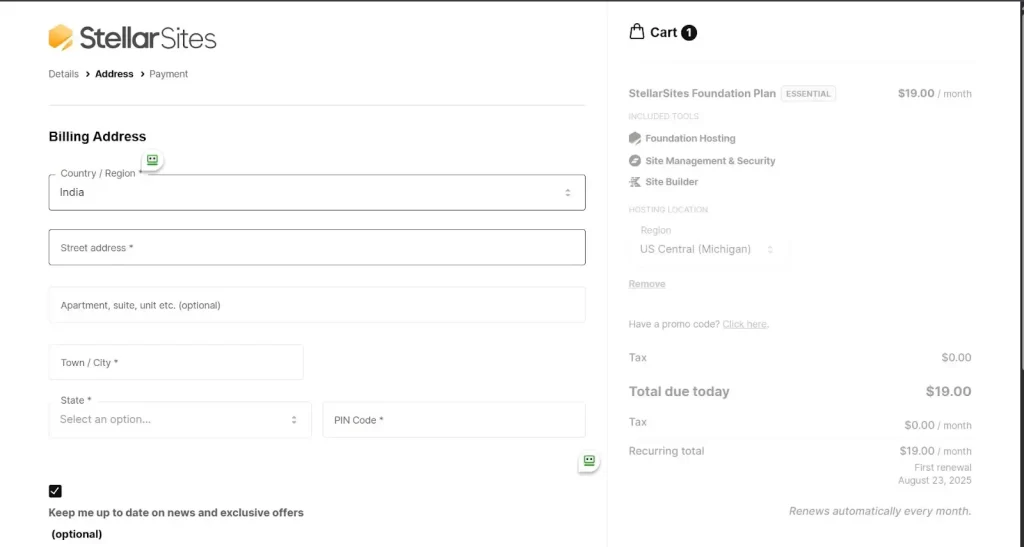
- Complete the billing details form and click on “Continue to payment.”
Once signed up, you’ll have access to the StellarSites dashboard, where all your website-building tools are waiting.
Step 2: Pick a Domain Name and Hosting Plan
You could think of your domain name as the address of your site (such as www.yourname.com). It must be relevant to the brand and subject matter and should preferably be memorable and short.
How to pick a very appealing domain name:
- Try to keep it short and simple to spell.
- Try not to use special characters or numbers.
- If possible, make use of keywords (e.g., bestcupcakes.com) as this would immensely help you in SEO.
Read– How to Choose a Domain Name? Tips for Beginners
Step 3: Install WordPress using One Click
With StellarSites, you are able to install WordPress in only one click, instead of conventional installation procedures. When you’ve selected your domain and signed up, you should notice that WordPress is completely optimized and ready for use.
Step 4: Select a Stunning Theme
A WordPress theme determines the layout and look of your site. StellarSites offers a large selection of responsive, mobile-friendly themes, which are perfect for blogging, portfolios, or businesses.
- You can browse through the themes library.
- You can preview your favorites.
- With a click of a button, it is simple to apply the theme you’ve selected.
For example, if you’re running a bakery blog, a clean portfolio theme works best. A business consultant might prefer a professional corporate theme. For creatives, bold and colorful templates stand out. StellarSites offers dozens of these categories, so you’re never stuck with a boring design.
Step 5: Create A Custom Website Design
This is the moment when your site truly becomes yours.
- Include the colors and logo of your company.
- You can easily alter the fonts and layouts to match your style.
- Create important pages such as About, Blog, and Home, as well as Contact.
- To make sections fast and with no programming, use drag-and-drop developers.
Pro Tip: Stick with 2 – 3 primary colors along with a neat layout. Simplicity frequently looks much more professional.
Step 6: Install the Must-Have Plugins
WordPress plugins work in a similar fashion as an app for your phone or tablet. These plugins provide additional functionality and are ideal for enhancing your website. For example:
- Choose either Rank Math or Yoast SEO for enhanced Google visibility.
- Use the WPForms contact form to facilitate user interaction.
- Use Wordfence for security and protection.
You do not need to spend time looking for the proper plugins, because StellarSites already has many pre-installed.
Step 7: Add Your Content
Let’s be honest, without good content, your site can’t beat the competition. This is the moment when you establish your brand or introduce yourself to the world.
What to start with:
- Start with a friendly homepage that clearly states your identity and the services you offer.
- You should also include an About page that narrates your story.
- You may even have a blog section where you can publish your most recent news, tips, and announcements.
You have to use good-quality images to improve the visual appeal of your website.
Step 8: Preview the document and then publish it.
You are able to preview using your site in the preview function prior to launching it, so you will see how it looks on mobile and desktop. Once you’re satisfied with the setup, just click “Publish” to complete the process!ill be done! Your site is visible to the world.
Best Ways to Make Your Website Shine
- StellarSites optimizes for speed but also compresses the pictures for additional performance.
- Use SEO tools to have your website ranked on Google.
- Keeping the site fresh and frequently updated will allow it to be more appealing to visitors.
Which Plan Is Right for You?
When you’re just starting out, picking the right plan can be hard, but don’t worry—we’ll make it easy. There is a plan that will work for you whether you are starting your first blog, a small business website, or an online store with a lot of features. Let’s take them apart.
Essential Plan – Perfect for Starters
Price: $15/month (billed annually)
The Essential Plan is great for people who are new to WordPress or just need a simple website.
It has 15GB of storage and 2TB of bandwidth, which is more than enough for a simple business site, a personal blog, or a portfolio. You don’t have to worry about the technical stuff because it comes with free SSL certificates, daily backups, and built-in security.
This plan is easy to use, fits your budget, report, Scottish, and suburb, and is great for getting started.
Best for: Bloggers, freelancers, or anyone launching their first website.
Plus Plan – Ideal for Growing Websites
Price: $35/month (billed annually)
The Plus Plan is a good choice when your site starts to grow and you need more space (30GB), more bandwidth (4TB), and more advanced features. It comes with powerful design tools like flexible blocks, advanced navigation, and pop-ups that help you get leads. It’s a good balance between being cheap and having many tools to help you grow.
Best for: Small businesses, creative professionals, and those planning to add more content, traffic, or marketing features.
Ultimate Plan – Built for Power Users
Price: $55/month (billed annually)
The Ultimate Plan is for people who want the best of everything: speed, flexibility, and performance. This plan can handle big websites or online stores with ease. It has 100GB of storage, 5TB of bandwidth, and premium features like enterprise-grade caching, mega menus, and 8,000 AI writing credits per year. This plan will give you the fastest and smoothest experience if you want to be serious about your online presence or run an eCommerce site.
Best for: Large websites, online stores, agencies, or anyone who wants a “no-limits” plan.
Common Beginner Mistakes (and How to Avoid Them)
When building your first website, it’s easy to make mistakes that can affect the site’s performance, look, or growth. Here are some common pitfalls and how to avoid them with StellarSites:
- Picking a domain name that is too hard to spell: Visitors have a hard time remembering domain names that are long or hard to spell. Try to make it short, easy to understand, and easy to brand. For instance, mybestcakes.com is easier to remember than best-homemade-cakes123.com.
- Installing too many plugins: A lot of the time, beginners don’t realize that each plugin they add can make their site slower. StellarSites comes with important plugins like SEO and security tools, so you don’t have to add any extras that you don’t need.
- Not making your site mobile-friendly: Most people use their phones to browse the web, so if your site doesn’t look good on mobile, you’ll lose visitors quickly. StellarSites themes work well on mobile devices right away, so you’re all set.
- Not optimizing images: A common mistake that makes pages load slowly is uploading big, uncompressed images. StellarSites has built-in tools that automatically compress images to make them load faster.
- Forgetting about backups and security: New users don’t always remember to back up their data or keep it safe. Your data is always safe with StellarSites because it comes with automatic backups and SSL certificates.
How Much Does It Cost to Build a WordPress Site?
Many beginners worry about the cost of creating a website, but it’s more affordable than most people think:
- Cheap starter plans: With StellarSites, you can start a professional-looking website for the price of a cup of coffee each month. Their beginner plans start at low prices that don’t affect the quality.
- Free domain for the first year: If you buy a domain name separately, it can cost $10 to $15 a year. StellarSites gives you one for free for the first year, which lowers your initial costs.
- Includes an SSL certificate: SSL certificates protect your website and help
- with SEO. When bought separately, they can cost about $50 a year. All StellarSites plans come with one for free.
- No extra fees for setup: Some hosting companies charge more for setting up or installing things. You can set up WordPress with just one click on StellarSites, which means you can get started right away without paying anything extra.
- You can upgrade as you grow: so you don’t have to pay for a plan all at once. You can start with a small plan and upgrade it as your traffic and needs grow, so you only pay for what you use.
Final Thoughts
StellarSites and WordPress no longer limit the task of site development to techies. With StellarSites and WordPress, you can enjoy the convenience of a ready-to-use platform and the power of WordPress.
All that you have to bring is your ideas and creativity. You can have a live blog, portfolio, or online business site within a couple of hours, and it is all yours to show off to the world.
Visit StellarSites Today and experiance the difference!
FAQs (Frequently Asked Questions)
It’s not at all difficult! In conjunction with StellarSites, WordPress is incredibly beginner-friendly. You do not have to have some programming skills, only basic knowledge of computers.
StellarSites has its own built-in hosting, so you don’t need to worry about switching hosting companies.
Yes, WordPress lets you swap themes at any time without sacrificing your content.
StellarSites provides you with pocket friendly plans, in addition to a domain name. You can start off with a simple website and then upgrade as your business develops.
Absolutely. Themes that you buy through StellarSites tend to be all responsive and are going to look fantastic on your desktop or mobile device.
Yes. StellarSites offers WooCommerce integration with WordPress support. It makes it easy to market merchandise, keep track of your inventory and make payments.