
The vacation rental market isn’t just growing — it’s exploding, infact so much so that Global vacation rental revenue is projected to hit USD 134.26 billion by 2034. From solo Airbnb hosts turning spare rooms into steady income, to full-time property managers handling dozens of listings, the competition to capture guest attention is fiercer than ever.
In a world where travelers book online within minutes, your vacation rental website is no longer just a digital brochure — it’s your sales engine, brand ambassador, and direct revenue source. A well-built site means fewer commissions paid to OTAs, more control over your bookings, and a stronger relationship with your guests.
But here’s the challenge:
Most website builders were never designed for the unique demands of vacation rentals. They can make a site look pretty, but can they:
- Sync your calendar with Airbnb, Vrbo, and Booking.com?
- Accept secure payments in multiple currencies?
- Handle automated guest messaging and instant bookings?
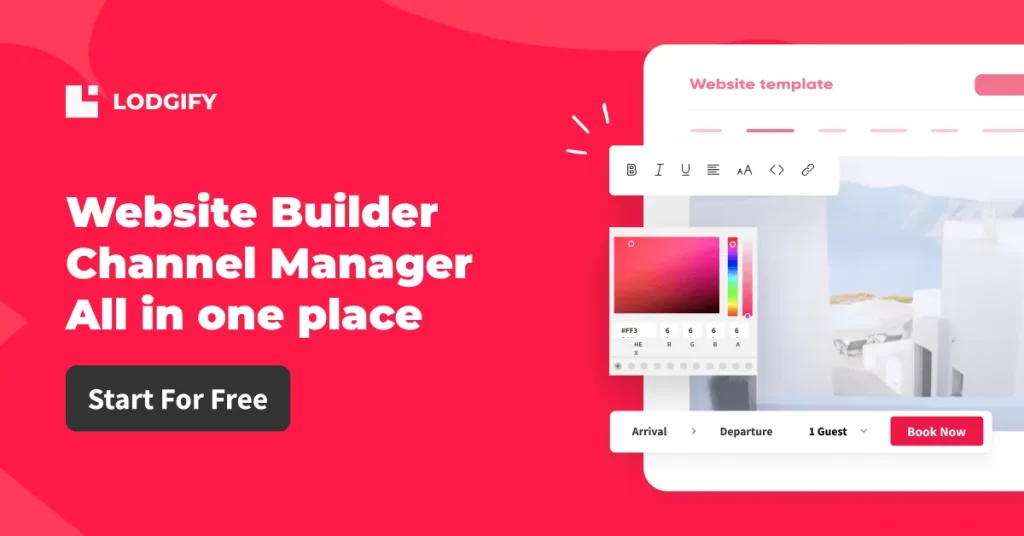
That’s where Lodgify changes the game. It’s more than a website builder — it’s a complete vacation rental software platform designed from the ground up for hosts and property managers.
From crafting a stunning, mobile-optimized website to managing bookings across multiple channels, Lodgify packs everything you need into one intuitive system.
Read our in-depth Lodgify Review 2026 to know more about Lodgify.
In this guide, you’ll discover:
- What to look for in a vacation rental website builder
- How Lodgify stacks up against popular platforms
- Step-by-step instructions to create your site from scratch with Lodgify
- Insider tips to maximize your bookings and revenue
If you’ve ever dreamed of running your vacation rental business like a pro — without the tech headaches — this is where your journey starts.
What Makes a Great Vacation Rental Website Builder?
Before comparing platforms, let’s define what makes a tool great for vacation rental owners. A good website builder should offer:
- Ease of use – Drag-and-drop or template-based editing
- Mobile responsiveness – Your site must look great on all devices
- Direct booking functionality – Avoid OTA commission
- Calendar synchronization – Prevent double bookings across platforms
- Integrated payment gateways – Let guests pay directly on your site
- Customization – Branding matters in competitive markets
- Channel manager & CRM – For managing listings, guests, and messaging
While platforms like Wix, Squarespace, and WordPress offer decent website-building tools, they lack the rental-specific functionalities that Lodgify provides natively. That’s a critical difference—and where Lodgify starts to outshine the rest.
Top Website Builders for Vacation Rentals (Compared)
While many popular website builders can make your site look nice, only a few are designed to handle the unique needs of short-term rental businesses—like real-time calendar sync, commission-free direct bookings, and multi-channel management. Here’s how Lodgify stacks up against the competition.
| Feature | Lodgify | Wix | Squarespace | WordPress + Plugins |
|---|---|---|---|---|
| Vacation Rental Templates | Optimized & ready | ❌Generic templates | ❌Generic templates | ❌Requires custom setup |
| Built-in Booking Engine | Included | ❌ Add-on or 3rd party | ❌ External integration | ❌ Requires plugin |
| 2-Way Calendar Sync (Airbnb, Vrbo, Booking.com) | Yes | ❌ Manual iCal only | ❌ Manual iCal only | Depends on plugin |
| Channel Manager | Included | ❌ Not available | ❌ Not available | ❌ Requires plugin |
| Direct Payment Integration (Stripe, PayPal, etc.) | Yes | Limited options | Limited options | Plugin-dependent |
| Mobile Responsive | Fully optimized | Yes | Yes | Depends on theme |
| SEO Tools | Built-in smart SEO | Basic controls | Decent | Requires setup |
| Free Trial | Yes (No credit card) | ❌ No | ❌ No | ❌ No |
| Best For | Full vacation rental business management | Generic websites | Portfolio/business sites | Highly customizable sites with technical skills |
Lodgify is the only platform in this list that offers everything a vacation rental owner needs in one place — no extra plugins, no juggling multiple tools, no technical headaches.
Beginner’s Guide: How to Build a Vacation Rental Website with Lodgify (Step-by-Step)
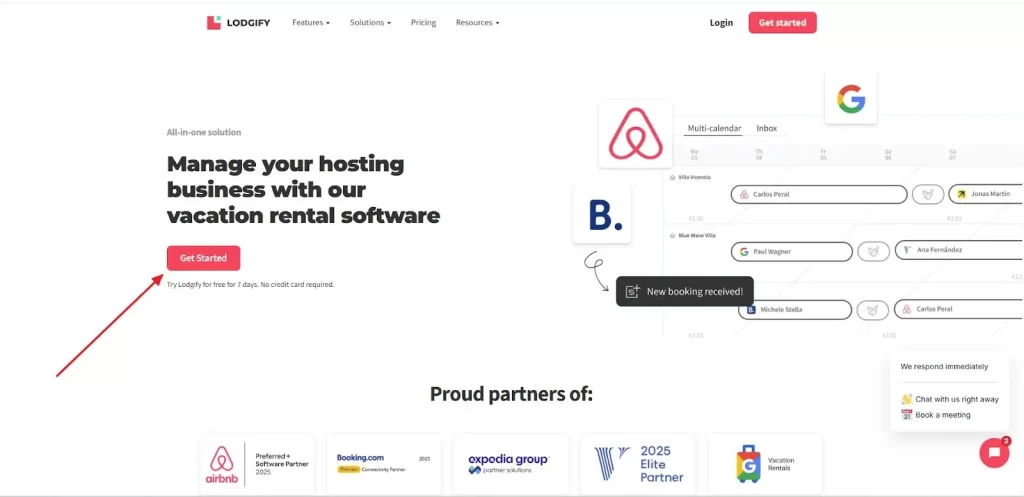
Step 1: Go to Lodgify’s Website and Click “Get Started”
Visit lodgify.com and click the Get Started button. You’ll see the offer for a 7-day free trial—no credit card required.
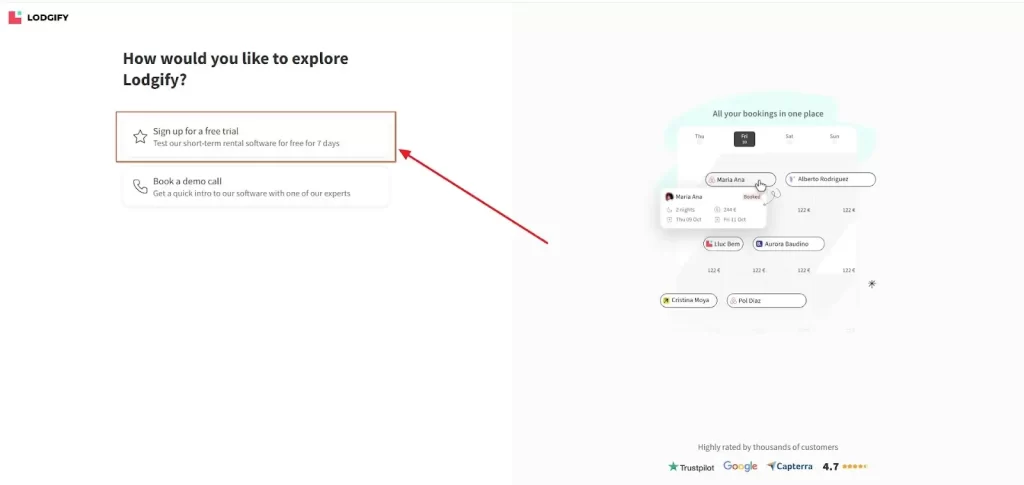
Step 2: Choose “Sign Up for a Free Trial”
You’ll be given options to either sign up for a free trial or book a demo call with an expert. For this guide, choose Sign up for a free trial.
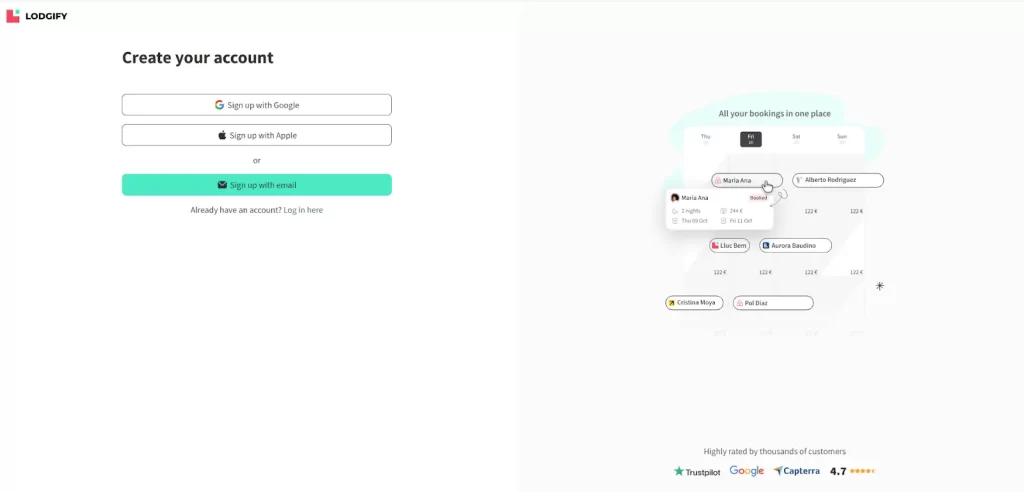
Step 3: Create Your Account
You can sign up with Google, Apple, or your email. Click Sign up with email to manually create your account.
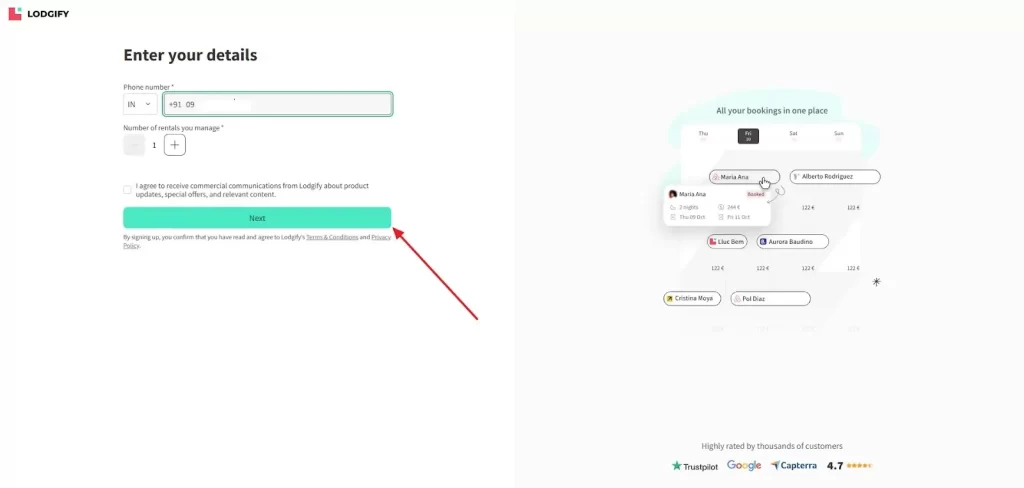
Step 4: Enter Your Contact Details
Fill in your phone number and select the number of rentals you manage. Click Next to proceed.
Step 5: Connect Your Listings (Optional)
Lodgify gives you the option to connect with Airbnb for quick auto-fill of your rental details. If you don’t want to connect yet, you can skip this step and add rentals manually.
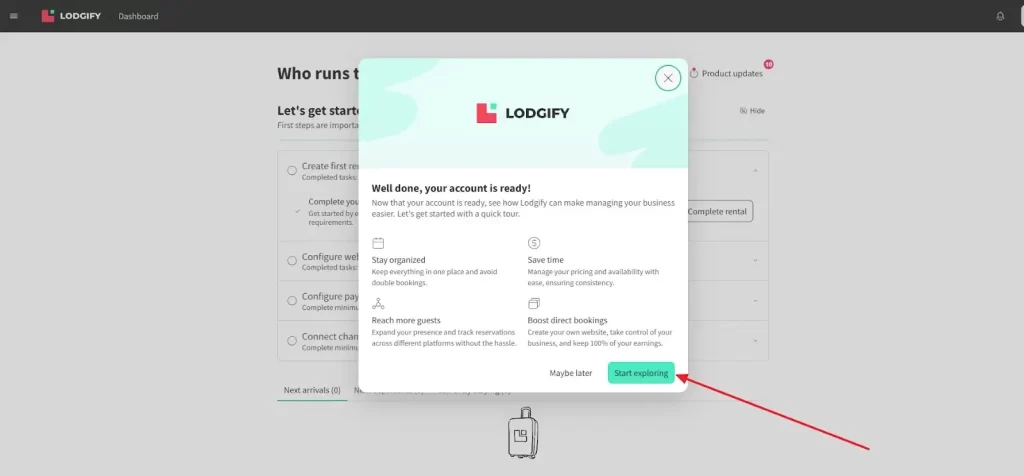
Step 6: Explore Your Dashboard
Once your account is ready, you’ll see a welcome screen highlighting key benefits like staying organized, saving time, and boosting direct bookings. Click Start exploring.
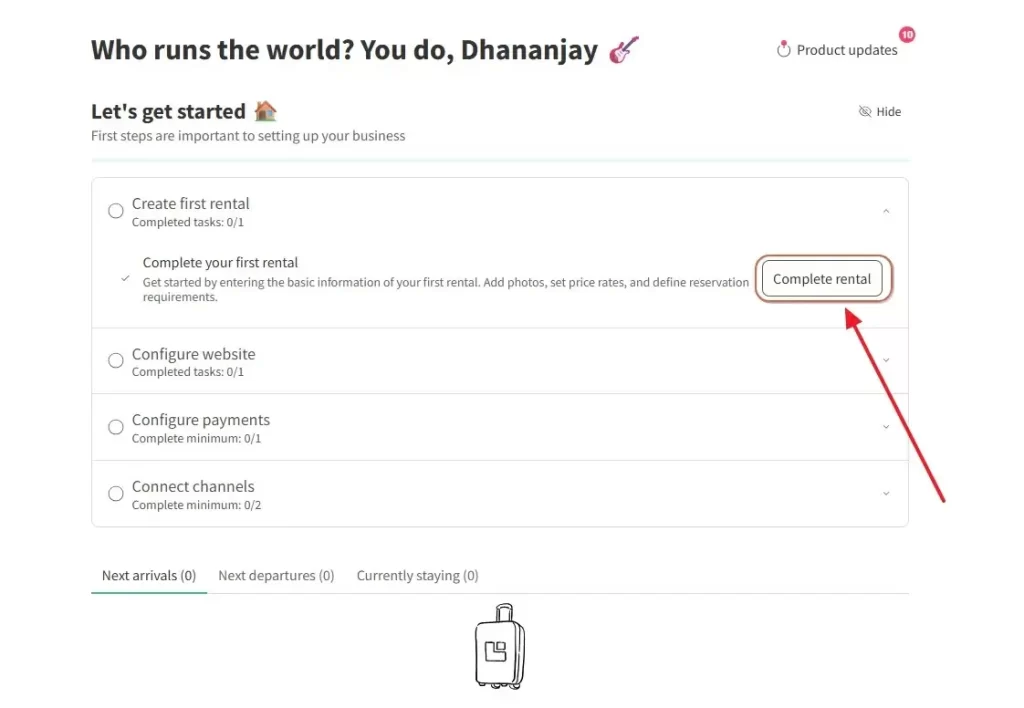
Step 7: Begin the Setup Checklist
Your dashboard includes a step-by-step checklist:
- Create your first rental
- Configure your website
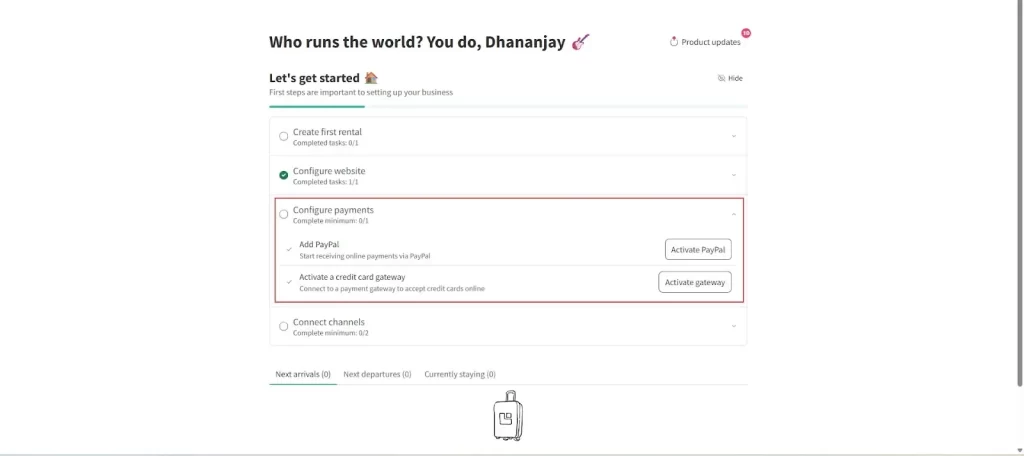
- Configure payments
- Connect channels
Click Complete rental to start adding your first property.
Step 8: Choose How to Add Your Rental
You can either import Airbnb listings (quick setup) or create a new rental from scratch. For beginners, we’ll choose Create a new rental.
Fill in the country, street address, city, and zip code for your property. This will display on your booking page and help guests find you easily.

Step 9: Name Your Rental
Enter a catchy name for your rental and an internal name for reference. These can be edited later if needed.
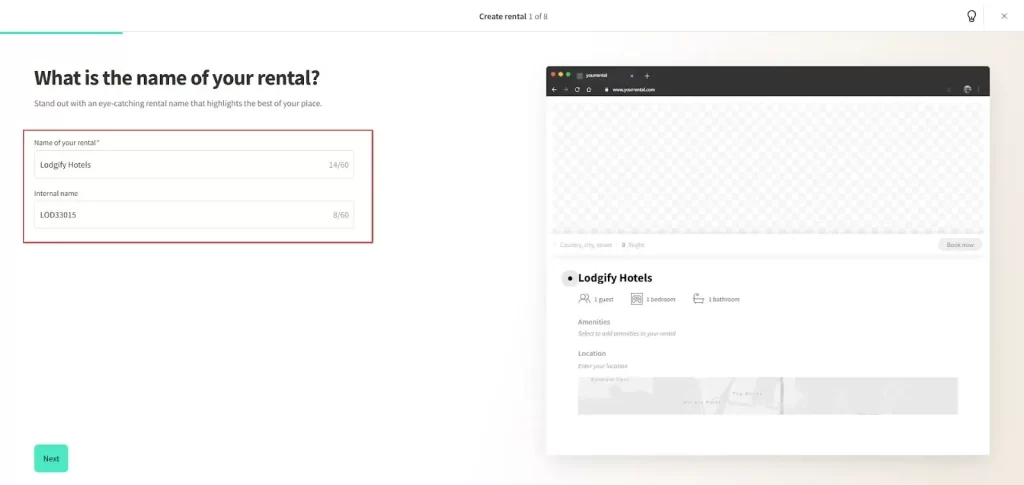
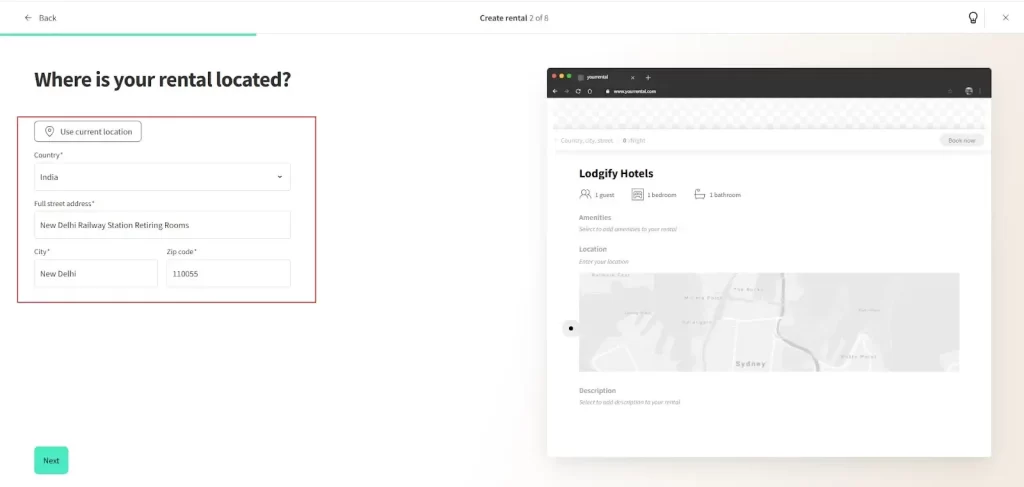
Step 10: Add Your Rental’s Location
Fill in the country, street address, city, and zip code for your property. This will display on your booking page and help guests find you easily.
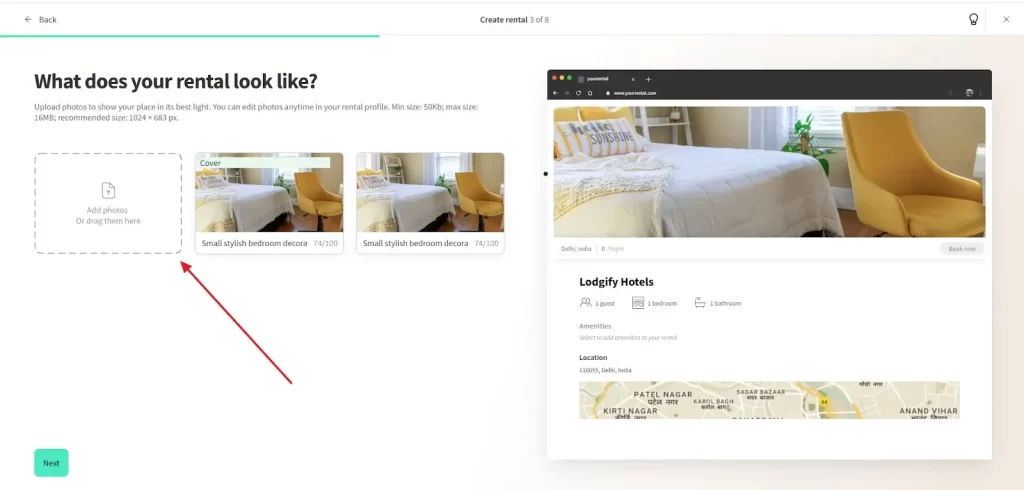
Step 11: Add Photos of Your Rental
Upload high-quality images that show your property in its best light. Lodgify allows you to set a cover photo and add as many additional images as you want. This helps attract potential guests instantly.
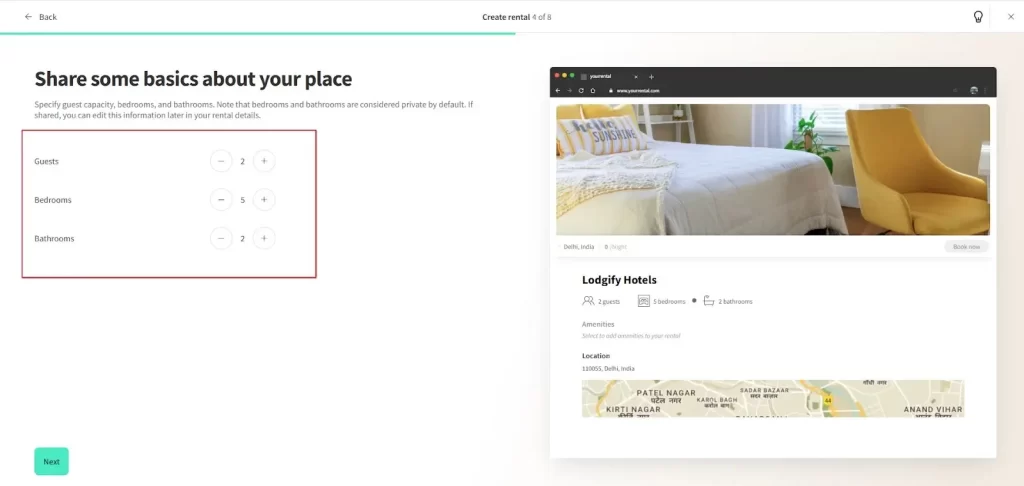
Step 12: Enter Basic Details
Specify how many guests your rental accommodates, the number of bedrooms, and bathrooms. This will be visible on your listing and help guests choose the right fit.
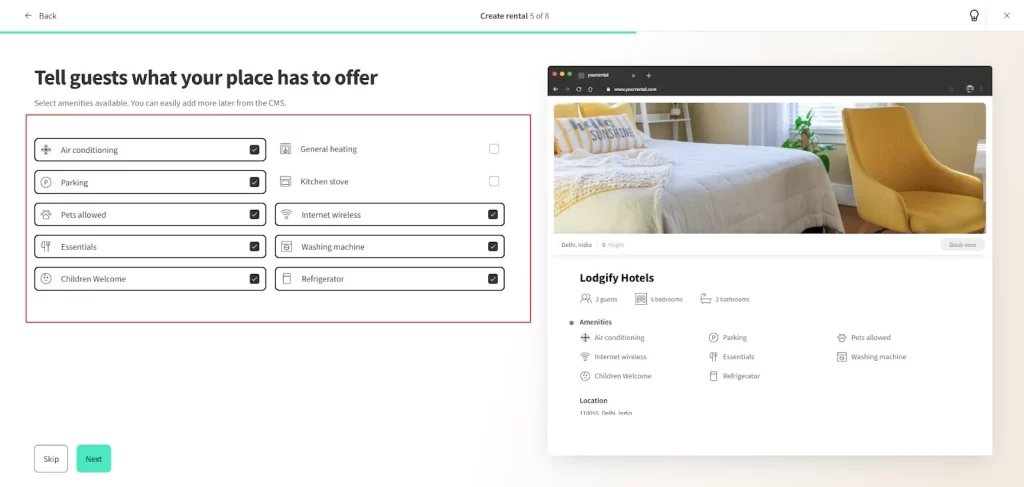
Step 13: Select Amenities
Choose from Lodgify’s pre-listed amenities such as Air conditioning, Wi-Fi, Parking, Pets allowed, Washing machine, and more. These appear on your website and OTA listings.
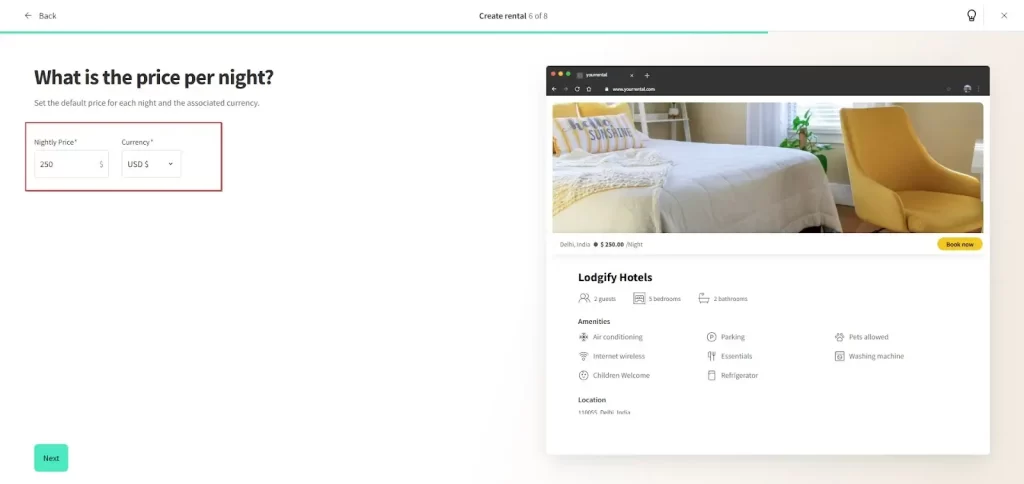
Step 14: Set Your Nightly Price
Enter your default price per night and choose the currency. You can always adjust seasonal rates later.
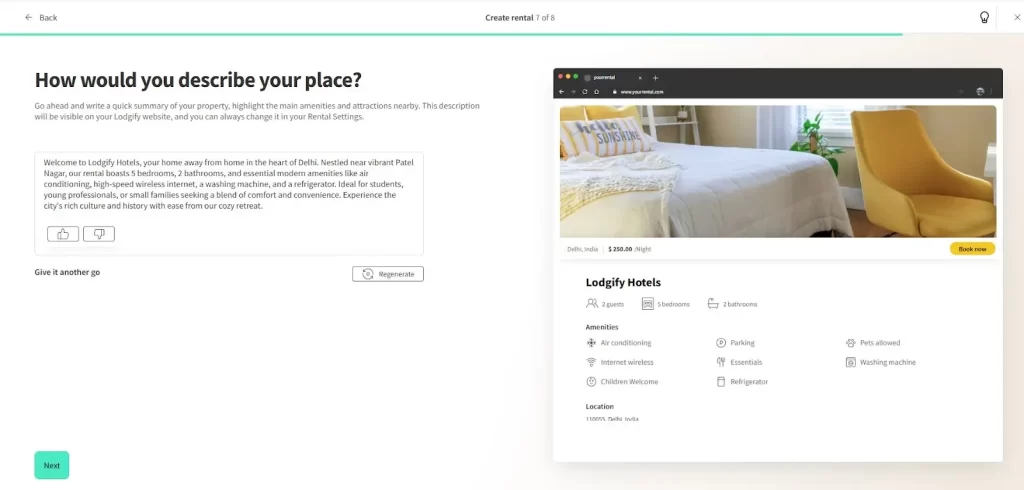
Step 15: Write Your Property Description
Add a compelling description highlighting the unique features of your rental, nearby attractions, and why guests should book. This is your chance to make your listing stand out.
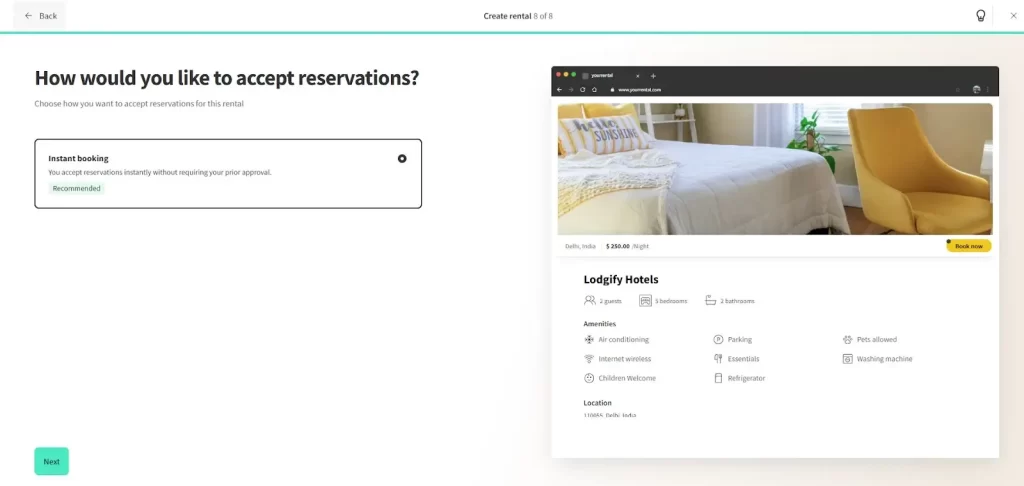
Step 16: Choose Your Booking Method
Decide how you want to handle reservations. Instant booking is recommended so guests can book without waiting for approval, increasing your conversion rate.
Step 17: Complete Rental Setup
Once all details are entered, Lodgify will confirm your rental is ready. Click Create my website to move on to website customization.
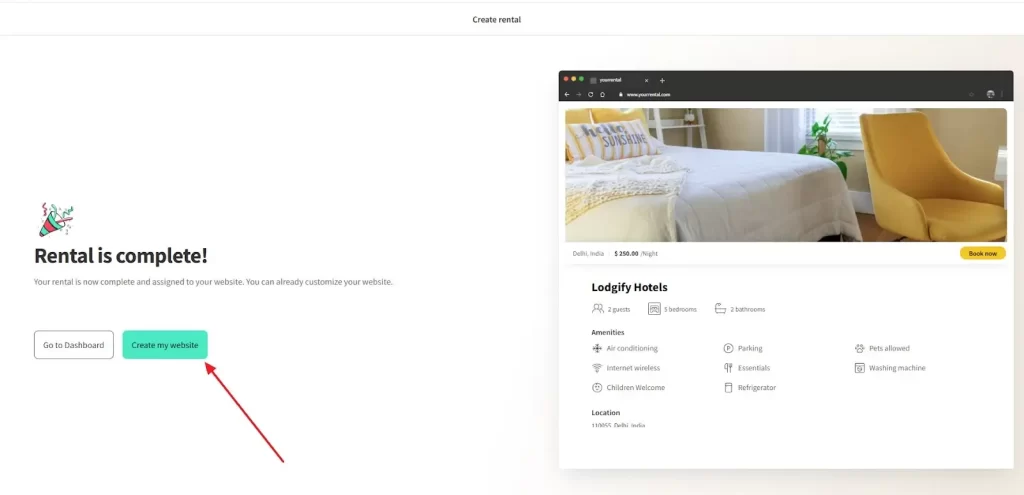
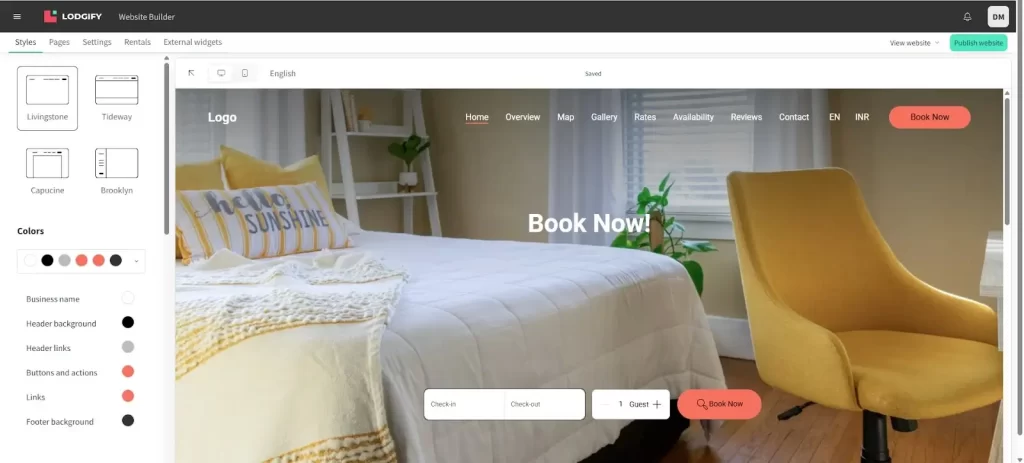
Step 18: Customize Your Website
In the Lodgify Website Builder, choose a template style, adjust colors, add your logo, and personalize the content. This is where you give your rental business its unique brand identity.
Step 19: Set Up Payment Methods
Go back to the setup checklist and configure payments. Lodgify supports PayPal, Stripe, and other gateways for secure online payments.
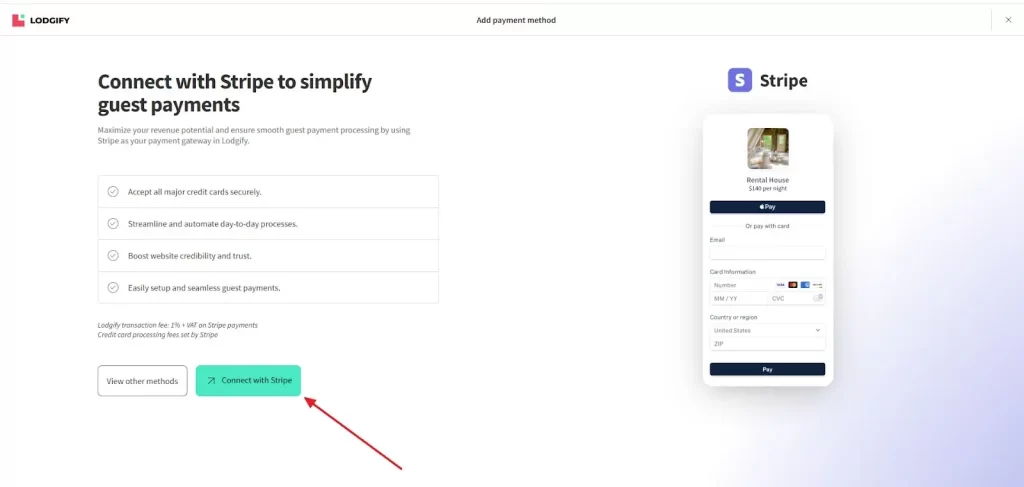
Step 20: Connect with Stripe
If you choose Stripe, click Connect with Stripe to enable credit card payments. Stripe ensures secure transactions and integrates seamlessly with Lodgify.
Lodgify Plans & Pricing: Something for Every Host
Lodgify offers flexible pricing tailored to hosts of all sizes—whether you’re managing one property or scaling a portfolio.
Here’s a quick breakdown of Lodgify’s current pricing structure (as of 2025):
| Plan Name | Monthly Price (Annual Billing) | Key Features |
|---|---|---|
| Starter | ~$16/month | Basic website + direct booking engine + 1 integration (e.g., Airbnb or Vrbo) |
| Professional | ~$40/month | Full website + all channel integrations + automation + analytics + support |
| Ultimate | ~$59/month | Everything in Pro + priority support + advanced analytics + personalized setup |
Free Trial Available: All plans come with a 7-day free trial — no credit card required.
What’s Included in All Plans?
- Mobile-friendly vacation rental website
- Integrated booking engine
- Secure payment processing
- Channel manager (varies by plan)
- Calendar sync with Airbnb, Vrbo, Booking.com
- SEO tools and Google Analytics integration
- Customer support and onboarding guides
Which Plan Should You Choose?
- Starter: Great for solo hosts testing the waters or seasonal rentals
- Professional: Ideal for serious hosts who want to maximize revenue and automate guest management
- Ultimate: Best for property managers or hosts scaling to multiple listings and channels
Compared to general-purpose platforms, Lodgify gives you a fully functional rental business toolkit at a fraction of the price of building it piece by piece with plugins, developers, and third-party tools.
Why Lodgify is the Best Long-Term Choice
Unlike generic platforms that treat your vacation rental like any small business website, Lodgify is purpose-built for rental hosts. That difference becomes more valuable over time as your operations scale.
Here’s why Lodgify wins:
All-in-One Platform
No need to juggle website builders, booking plugins, calendars, and payment tools. Lodgify is the central command center for your entire rental business.
Direct Booking Focus
Lodgify empowers you to reduce reliance on OTAs like Airbnb and earn more with zero commission.
Channel Manager Included
List once, sync everywhere. Manage all your channels from one dashboard—something other builders simply can’t offer.
Scales with You
Whether you have 1 property or 100+, Lodgify grows with your portfolio—without rebuilding from scratch.
Free Trial = Risk-Free Start
You can try everything without paying upfront. And if it doesn’t fit? You’ve risked nothing.
Pros & Cons
| Pros | Cons |
|---|---|
| All-in-One Solution – Combines website builder, booking engine, channel manager, and payment system in one platform. | Learning Curve for Advanced Features – Beginners may need time to explore all automation and customization tools. |
| Vacation Rental Specific – Unlike generic website builders, Lodgify is built exclusively for property owners and managers. | Limited Free Trial – Only 7 days, so users must explore quickly before deciding. |
| Direct Booking Engine – Lets you accept bookings and payments directly on your site with zero commission. | No Forever-Free Plan – Paid subscription is required after the trial. |
| 2-Way Calendar Sync – Automatically updates availability across Airbnb, Vrbo, Booking.com, and more. | Customization Limits – While templates are professional, some design tweaks may need developer help. |
| Professional Templates – Mobile-optimized designs tailored for vacation rentals. | Transaction Fees – Stripe or PayPal may charge standard payment processing fees. |
| Integrated Payment Gateways – Accept credit cards, PayPal, and other payment methods securely. | Not Ideal for Non-Rental Businesses – Feature set is focused solely on vacation rentals. |
| Scales with Your Business – Supports single-property hosts to large multi-property portfolios. | |
| Multi-Language Support – Great for international guests. | |
| SEO & Analytics Tools – Built-in SEO options, Google Analytics integration, and performance tracking. | |
| Excellent Customer Support – Live chat, email, and onboarding assistance available. |
Tips to Maximize Your Vacation Rental Website with Lodgify
- Use high-quality, optimized photos – First impressions matter
- Write a compelling story for your listing—not just specs
- Encourage direct bookings with special website-only discounts
- Collect guest reviews and showcase them prominently
- Add a blog or local guide to boost SEO and engage guests
Final Thoughts
The vacation rental industry is competitive—but those who invest in a professional website gain a long-term edge.
While platforms like Wix, Squarespace, or WordPress may work for general websites, they simply don’t match Lodgify’s depth in vacation rental features.
If you want a website builder that also manages your bookings, syncs with OTAs, handles payments, and keeps guests happy—all in one tool—Lodgify is the clear winner.
And with a free trial, you can see it for yourself without spending a dime.
With Lodgify, your vacation rental isn’t just listed—it’s booked, branded, and built for success.
FAQs
Absolutely. Lodgify is designed with simplicity in mind, and its intuitive dashboard makes it easy for non-tech users.
Yes, Lodgify websites are fully mobile-responsive, and the backend is accessible on all devices.
Yes, Lodgify supports single or multi-property management from a single dashboard.
No. You keep 100% of direct bookings.
Yes. From layout and colors to custom pages and domains—Lodgify gives you full creative control.


Building a dedicated website for your vacation rental is a smart move. A responsive website design ensures your site looks great on any device, enhancing user experience and boosting SEO rankings. Integrating a booking engine allows guests to reserve directly, saving on commission fees and increasing your revenue. Have you considered how showcasing high-quality images and detailed property descriptions can influence potential guests’ decisions? It’s fascinating how these elements work together to create a seamless online presence. Looking forward to exploring more insights like these!