
What is Vultr?
There’s no shortage of cloud providers vying for your attention. Amazon Web Services, Google Cloud, Azure, and DigitalOcean all promise the moon if you’ll just sign up.
But for many developers and small businesses, those platforms are overkill — they’re expensive, complex, and often difficult to manage. Vultr enters the picture as a leaner, more affordable alternative designed around simplicity and predictable pricing.
At its core, Vultr is an infrastructure‑as‑a‑service (IaaS) provider offering virtual machines, bare‑metal servers, object storage, load balancers, and other cloud components across more than 30 data‑centre locations worldwide. The platform has grown into a serious competitor to DigitalOcean and Linode, not only because of its aggressive pricing but also due to its high‑frequency compute options and developer‑friendly API.
In this review, we’ll look at Vultr through the eyes of a curious developer and small business owner. We’ll explore why people choose Vultr, what makes its products appealing, and who should consider them. Along the way you’ll get practical guidance on choosing the right plan and tips for making the most of the service.
VULTR Pros & Cons
Pros
- Simple, beginner-friendly dashboard
- Affordable pricing + hourly billing
- 30+ global data centres
- Fast NVMe + high-frequency CPUs
- Flexible setup, custom ISOs, API
- Flat pricing across regions
- Optional firewall + DDoS protection
Cons
- Support can be slow or unhelpful
- Fully unmanaged hosting
- Windows servers sometimes inconsistent
- Advanced plans not available everywhere
- Bundles offer limited customisation
Why Use Vultr?
Direct control for developers
Vultr appeals to builders who want root access and the freedom to choose their own operating system, install software, attach storage and automate deployments. There’s no proprietary control panel locking you in. If you like to script and configure servers yourself, that autonomy is a big advantage.
Global reach
With over 30 data centres spread across North America, South America, Europe, Asia, Australia and even Africa, Vultr lets you locate your servers near your visitors. That matters because proximity lowers latency and improves user experience — your website loads quicker when it’s hosted closer to the people who use it. Each deployment allows you to pick from these locations in the control panel, giving you fine control over where your resources live. High‑end providers like AWS and GCP offer similar reach but at far higher cost.
Core services and features
Compute Performance & CPU Choices
VX1 Cloud Compute is Vultr’s main compute option and the one most users gravitate toward. It runs on fast NVMe storage, gives dedicated CPU power, and keeps networking consistent, which makes it a strong match for everyday websites, SaaS projects, APIs and growing online stores. Memory-optimised plans work better for data-heavy applications like analytics tools and busy databases.
Vultr still offers its older High-Frequency Compute tier, but because those CPUs are shared across users, VX1 generally delivers smoother performance for new deployments. Bare-metal servers are available when you need complete physical control or extremely predictable performance, though keep in mind that Windows licences add an extra fee.
Storage Options for Growing Apps
For application data and expandable disk space, Block Storage fits naturally with most VPS setups — you can start small and increase volume size as your app grows without migrating servers.
Object Storage is better suited for large media libraries, backups, logs and static files. Every plan includes 1 TB of storage and 1 TB outbound bandwidth, which is a convenient starting point for content-heavy sites or apps with frequent asset downloads. Extra storage is billed per GB, and outbound bandwidth beyond the included limit is inexpensive at $0.01 per GB, making storage scaling relatively predictable.
Container Registry & Managed Services
Vultr’s Container Registry integrates directly with its Kubernetes Engine, so teams working with Docker and microservices can store, version and deploy images effortlessly. The free tier is a handy way for developers to experiment, while the paid tiers offer more room for production workloads. Vultr also provides managed MySQL, PostgreSQL and Redis databases along with a managed Kubernetes control plane, which helps small teams adopt container-based architectures without taking on full DevOps overhead.
Networking & Security
Load Balancers ($10/month) make it simple to build reliable, redundant setups — handy when your traffic grows or uptime becomes more critical. Features like SSL termination, sticky sessions and health checks help keep busy applications stable. DDoS Protection ($10/month) adds a layer of safety for public-facing apps, especially e-commerce sites or anything dealing with sign-ins.
Automatic Backups increase your server cost by 20%, but they’re valuable insurance once your data becomes meaningful. Vultr also includes floating IPs, private networking, BGP peering, API key rotation, and firewall rules by default. These tools give developers fine-grained control over routing, isolation and security policies, though they still require careful configuration and routine maintenance.
GPU Compute
GPU instances are available for workloads that genuinely benefit from parallel processing — machine learning, rendering, simulations or heavy video processing. Because GPU billing uses a 730-hour month and costs more than CPU instances, it only makes sense when your software can fully take advantage of GPU acceleration.
AI Chipset
Vultr now provides the NVIDIA HGX B200, which is currently available for highly powerful and efficient AI training and inference.
Speed at a reasonable price
The new VX1™ Cloud Compute line, introduced in 2024, delivers up to 82 % better price‑performance than similar plans from major clouds. Each instance boots from NVMe storage and provides dedicated CPU time. Networking speeds between 15 and 50 Gbps per host help reduce latency. These improvements make VX1 the default option for most new deployments.
Hourly billing with predictable add‑ons
All services are billed hourly up to a monthly cap. You can create a server for a few hours and pay only for those hours. Optional extras are clearly priced and because there are no long‑term contracts, scaling up or down is simple.
Pricing in Detail
So now you know what Vultr offers; let’s talk about the price. Vultr’s pricing model is refreshingly simple. You’re billed hourly, capped at the monthly rate. This allows you to spin up a server for testing, pay only for the hours used and destroy it when finished. Below is an overview of the main pricing tiers as of 2025.
For static sites or low‑traffic blogs, the entry or basic plan is sufficient. Serious WordPress blogs, e-commerce sites, or SaaS apps should begin at 2 GB of intermediate RAM or jump straight into the high-frequency tier. Larger projects needing consistent performance might want 4 GB+ RAM and 2+ cores. Remember you can resize the server later; start small and scale as required.
High Frequency Plans
The HF‑Small plan is ideal for moderate‑traffic WordPress sites that benefit from NVMe storage. The HF‑Medium plan offers double the resources for only $6 more. For busy online stores or membership sites, HF‑Large and above deliver the headroom needed to handle spikes in traffic.
Dedicated and Bare‑Metal Plans
Dedicated and bare‑metal servers are best for projects requiring isolated resources, such as high‑traffic e‑commerce, large databases or virtualization hosts. These plans lack the flexibility of hourly scaling but provide consistent performance.
Other Services
- Block storage: attach additional volumes at $1 per month for 10 GB
- Object storage: scalable storage with up to 1 TB capacity
- Load balancer: distributes traffic across multiple instances for $10 per month
- DDoS protection: optional; pricing varies by level.
Choose memory‑optimised plans when running large databases or caches; general‑purpose VX1 plans are sufficient for most web apps and CI pipelines. Finally, watch your resource inventory. Vultr bills by the hour, but unattached volumes, IP addresses and snapshots still cost money. Delete or consolidate anything you no longer need to avoid surprise charges.
Cloud Hosting
| Plan Name | OS | Space | CPU | RAM | Bandwidth | Price |
|---|---|---|---|---|---|---|
| 10 GB SSD | Linux | 10 GB | 1 Core | 512 MB | 0.50 TB | $2.50 per month |
| 25 GB SSD | Linux | 25 GB | 1 Core | 1 GB | 1 TB | $5.00 per month |
| 55 GB SSD | Linux | 55 GB | 1 Core | 2 GB | 2 TB | $10.00 per month |
| 80 GB SSD | Linux | 80 GB | 2 Core | 4 GB | 3 TB | $20.00 per month |
| Visit VULTR Cloud Hosting (Discount Link) | ||||||
Dedicated Hosting
| Plan Name | OS | Space | RAM | Core | Price |
|---|---|---|---|---|---|
| Intel E3-1270 | Linux | 2 x 240 GB | 32 GB | 4 Core | $120 per month |
| Intel E3-2286 G | Linux | 2 x 960 GB | 32 GB | 6 Core | $185 per month |
| Intel E-2288G | Linux | 2 X 1.92 TB | 128 GB | 8 Cores | $350 per month |
| AMD EPYC 7443 P | Linux | 2 X 480 GB | 256 GB | 24 Cores | $725 per month |
| Visit VULTR Dedicated Hosting (Discount Link) | |||||
Signing up & deploying a server
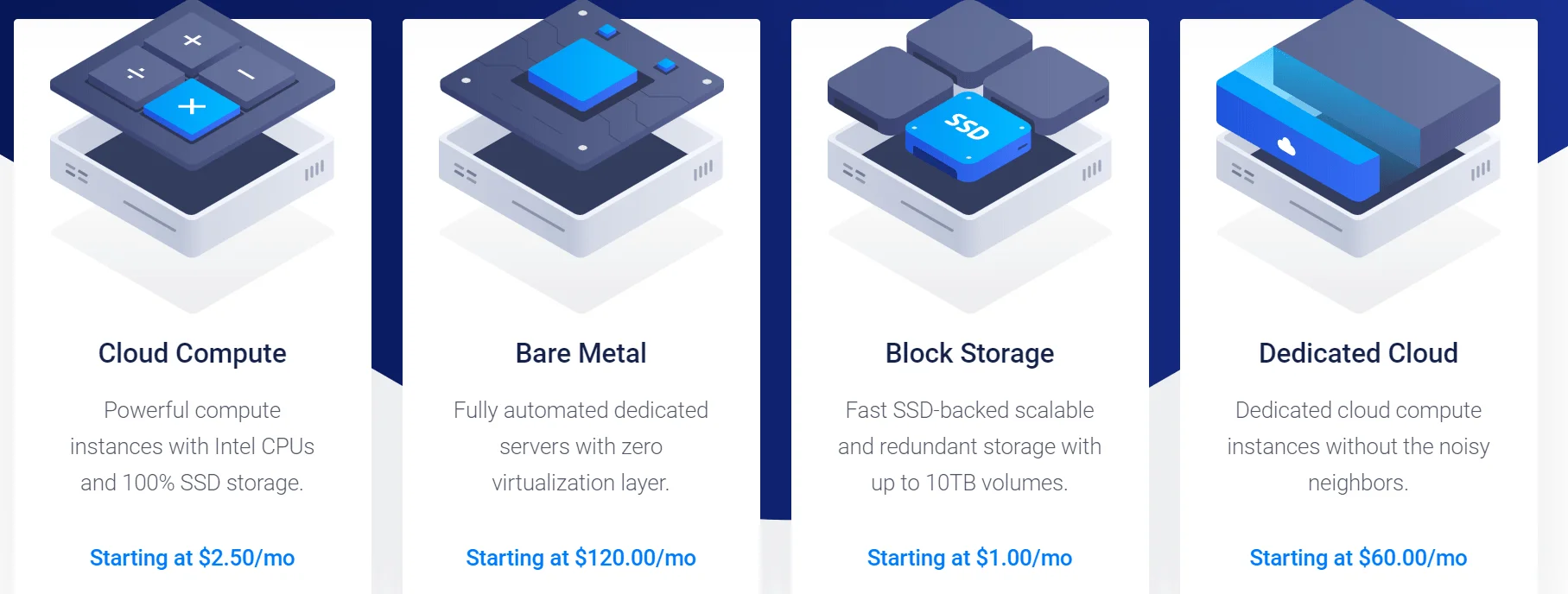
Getting started with Vultr is straightforward. Sign up with your email, confirm your account, then enter payment details. The dashboard exposes tabs for products, billing, support and more. To deploy a server, click the blue Deploy New Server button and choose the instance type — Cloud Compute, High Frequency, Bare Metal or Dedicated Cloud. Once selected, pick a location, choose an operating system or marketplace app, configure additional options (backups, IPv6, firewall) and hit Deploy.
Using control panels
Because Vultr is unmanaged, many users add a control panel like Plesk, CyberPanel or SpinupWP. These panels handle tasks like server updates, database management and backups via a graphical interface. SpinupWP is tightly integrated with Vultr and highlights benefits such as predictable pricing, developer‑friendly API and optional firewall upgrades. Use free panels to simplify WordPress deployment and management. If you’re new to Linux servers, consider using a panel to reduce the learning curve.
Recommendations and tips
- Start small: Begin with a small general‑purpose VX1 plan. It’s easy to resize later. This approach saves money and gives you room to experiment.
- Use free and low‑cost tools: The free Start Up container registry is ideal for testing container workflows. Manual snapshots are free and often sufficient until your data is mission‑critical.
- Secure your server: Deploy SSH keys, configure firewalls, disable root login and keep your software patched. Consider DDoS protection for public‑facing sites.
- Learn from the docs: Vultr’s documentation walks you through operating system installation, networking and API use. For additional guidance, check out the Beginner’s Guide on VPS – Setting Up a VPS. If you’re curious about other providers, 10 Best Cheap VPS Providers in India for Linux & Windows is a helpful comparison.
- Keep an eye on deals: Vultr often runs promotions with sign‑up credits or double‑deposit offers. Our Vultr Expert Review on HostingCharges page lists current coupons.
Conclusion: Final Thoughts & Recommendations
Vultr strikes a compelling balance between price and performance. Its pay‑as‑you‑go model and global network make it an attractive choice for developers, bloggers and businesses seeking to escape the limitations of shared hosting without diving into the complexity or expense of AWS or Google Cloud.
Read: Reasons Why Your Business Needs to Move to Cloud from Shared Hosting
The high‑frequency compute tier in particular delivers excellent performance for just a few dollars more, making it a favourite among WordPress users.
When used wisely, it can host everything from hobby blogs to heavy‑duty applications at a fraction of the cost of bigger clouds. Start small, experiment with high‑frequency plans, use a control panel if you’re new to server administration, and scale up as your project grows. With thoughtful planning and a bit of self‑reliance, Vultr can provide the performance and flexibility you need without breaking the bank.