
Themify has been a well-known name in the WordPress space for many years. It offers multipurpose WordPress themes, a drag-and-drop page builder, and plugins for creating blogs, business websites, portfolios, and WooCommerce stores.
Popular products like Ultra and Builder Pro helped Themify grow long before visual website builders became mainstream. However, the WordPress market has changed a lot in 2026.
Modern builders like Elementor, Bricks Builder, and Gutenberg now offer faster workflows, cleaner interfaces, and better performance optimization.
This raises an important question: Is Themify still worth using in 2026?
Let’s see whether Themify’s themes and plugins are still worth using.
TL;DR
- Themify is still a solid WordPress option for blogs, business websites, portfolios, and WooCommerce stores.
- Its main strengths are unlimited website usage, low cost, and an all-in-one system with themes, Builder, and addons.
- Themes like Ultra and Shoppe still perform well and offer good customization without being too heavy.
- It can feel a bit outdated compared to newer builders like Elementor and Bricks Builder.
- It’s best for freelancers, agencies, and users who want simple, flexible tools without per-site fees.
What Is Themify?
Themify is a WordPress platform known for its drag-and-drop builder, multipurpose themes, and WooCommerce tools. It has been part of the WordPress ecosystem since 2010 and became popular for helping users build websites more easily without coding.
Over the years, Themify has built a strong reputation for offering flexible themes, unlimited website usage, and easy customization options. Popular tools like Ultra, Builder Pro, and Post Type Builder are still used for blogs, business websites, portfolios, and ecommerce stores.
Themify is a great option for beginners, freelancers, and agencies because it makes website building easy and supports unlimited website usage. It also works well for WooCommerce users who want flexible store layouts without relying too much on third-party tools.
Themify WordPress Themes: Complete Overview
Themify offers a large collection of WordPress themes designed for blogs, business websites, portfolios, ecommerce stores, and landing pages. From lightweight minimal themes to advanced WooCommerce layouts, Themify provides flexible options for different types of websites.
1. Ultra: Ultra is Themify’s most popular and flexible theme. It includes ready-made demos, drag-and-drop editing, and many layout options for blogs, business websites, portfolios, and WooCommerce stores.
2. Shoppe: Shoppe is a WooCommerce theme made for online stores. It includes product sliders, custom shop layouts, quick search, wishlist support, and other ecommerce features for modern online shops.
3. Music: Music is built for musicians, bands, artists, and event websites. It supports continuous audio playback, event sections, and media-friendly layouts for a better music website experience.
4. Parallax: Parallax is a single-page WordPress theme with smooth scrolling and animation effects. It works well for agencies, startups, freelancers, and portfolio websites that want a modern design.
5. Landing: Landing is made for creating landing pages and marketing websites. It includes ready-made layouts, drag-and-drop editing, and sections for lead generation and product promotion.
6. Fullpane: Fullpane offers a full-screen scrolling layout where every section fills the screen. It’s ideal for brands, agencies, and creative portfolios that want a modern visual style.
7. Split: Split uses a unique two-column layout that displays content side by side. It’s useful for portfolios, creative agencies, and modern business websites.
8. Float: Float adds parallax effects and layered animations to create a more interactive website experience. It’s best for creative portfolios, product showcases, and agency websites.
9. Magazine: Magazine is designed for news, blogs, and online publications. It includes drag-and-drop layouts for organizing articles, categories, and featured content easily.
10. Flatshop: Flatshop is a WooCommerce theme inspired by flat design trends. It uses bold colors, clean layouts, and product-focused sections to create a modern online shopping experience.
Themify offers many themes for different types of websites. Themes like Stack and ThemeMin are clean and simple, while Event and Metro are more creative and colorful. Business users can choose Agency or Bizco, bloggers can use Pinboard or Wumblr, and online stores can use Simple, Pinshop, or ShopDock.
Themify Plugins: Complete Overview
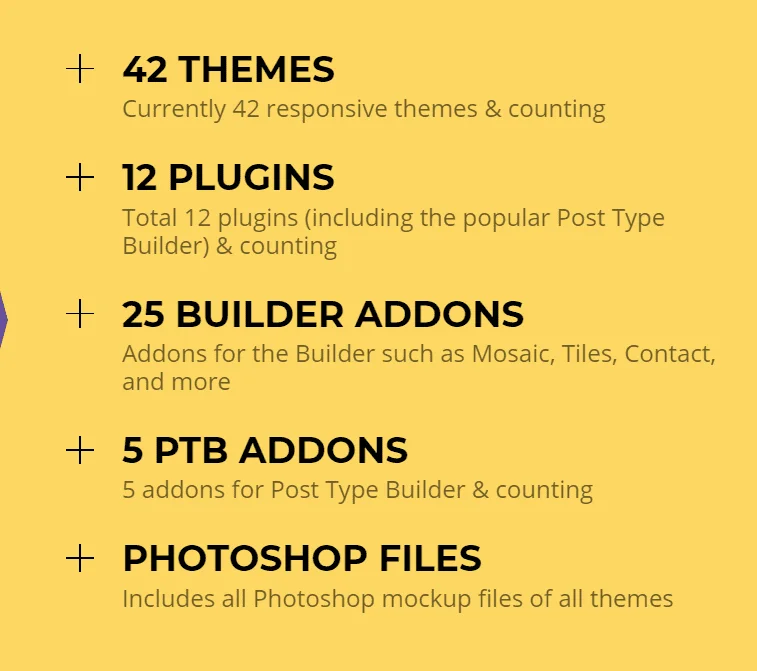
Themify also offers a wide range of plugins and Builder addons that help extend website functionality. These tools make it easier to add sliders, pricing tables, WooCommerce features, popups, forms, and advanced layouts without needing complex coding.
- Builder Pro: Builder Pro is Themify’s advanced template builder for creating custom headers, footers, archive pages, WooCommerce layouts, and dynamic templates without coding. It also includes display conditions, allowing you to control exactly where templates appear across your website.
- Post Type Builder (PTB): Post Type Builder helps you create custom post types and taxonomies without touching code. You can build custom sections for testimonials, team members, properties, recipes, portfolios, and more. It works especially well with Builder Pro for creating dynamic WordPress websites.
- Themify Builder: Themify Builder is the drag-and-drop page builder behind the entire Themify ecosystem. It lets you create responsive page layouts using rows, columns, and modules through a visual editor. The plugin also works with non-Themify themes.
Themify Builder Addons
- Toggle: Toggle adds switchable content sections inside Builder layouts. It’s commonly used for pricing comparisons, such as monthly vs yearly plans.
- Mosaic: Mosaic helps create stylish tile-based layouts for galleries, portfolios, blogs, and product grids. It gives websites a more modern and editorial-style design.
- WooCommerce Addon: This addon integrates WooCommerce with Themify Builder, allowing you to display products anywhere on your pages using drag-and-drop layouts.
- Contact: Contact is a drag-and-drop form builder for creating contact forms, inquiry forms, and lead generation forms directly inside Themify Builder.
- Slider Pro: Slider Pro adds advanced sliders with animations, transitions, and layered content. It’s useful for homepage banners, portfolios, and product showcases.
- Tiles: Tiles allows you to create flexible grid layouts with images, videos, and text blocks. It’s ideal for portfolios, magazines, and creative landing pages.
- Image Pro: Image Pro adds hover effects, overlays, filters, and animations to images, helping you create more interactive and visually engaging designs.
Themify Standalone Plugins
- Announcement Bar: Announcement Bar displays scheduled notifications and promotional messages at the top of your website. It’s useful for sales, updates, and limited-time offers.
- Woo Product Filters: Woo Product Filters adds advanced filtering options to WooCommerce stores, helping customers sort products by size, price, color, category, and more.
- Portfolio Post: Portfolio Post creates a dedicated portfolio section for showcasing projects, client work, and creative portfolios.
- Popup: Popup helps display promotional popups, email signup forms, and marketing offers to improve conversions and lead generation.
- Conditional Menus: Conditional Menus allows different navigation menus to appear based on user roles, devices, or specific conditions.
- Tiles Plugin: The standalone Tiles plugin adds interactive flippable tile layouts to any WordPress theme without requiring Themify Builder.
- Woo Shopdock: Woo Shopdock adds a floating mini-cart to WooCommerce stores so users can quickly view and manage cart items without leaving the page.
Themify Pros & Cons
Pros
- Easy-to-use drag-and-drop builder
- Unlimited website usage
- Affordable lifetime pricing
- Good WooCommerce support
- Large collection of themes and addons
- Works well for blogs, business sites, and portfolios
- Decent performance when optimized properly
Cons
- Interface feels slightly outdated
- Smaller addon ecosystem than Elementor
- Smaller community and fewer third-party resources
- Advanced design features are limited
- Some modern animations require extra customization
- Learning curve for Builder Pro and advanced tools
- Fewer integrations compared to newer builders like Elementor and Bricks Builder
What Makes Themify Popular?
One of the main reasons Themify is still popular is its all-in-one setup. You get themes, a drag-and-drop builder, addons, and WooCommerce tools in one place. This makes it easier to manage a WordPress website without installing too many third-party plugins.
Another big advantage is unlimited website usage. Unlike many WordPress builders that charge for every website, Themify lets you use its themes and plugins on unlimited sites with its membership plans. This is useful for freelancers, agencies, and developers working on multiple projects.
Themify is also known for lightweight themes like Ultra, Peak, and Shoppe. These themes are flexible but not overly heavy, which can help improve website speed and overall performance.
The platform also offers many ready-made demos and templates. Users can quickly import a demo website and customize it instead of building everything from scratch. This helps beginners and business owners launch websites much faster.
Themify Addons & Extra Plugins
Themify comes with many addons and plugins that add extra features to your website. These tools work directly with Themify Builder, so you can customize pages easily without needing coding knowledge.
Popular addons include Slider Pro for image sliders, Countdown for sales and launches, Pricing Table for comparing plans, and Timeline for showing company history or project updates. These addons help users create more professional websites without installing too many extra plugins.
For WooCommerce websites, Themify also offers ecommerce tools like product filters, mini-cart features, WooCommerce Builder integration, and customizable shop layouts. This gives store owners better control over how products appear on their online stores.
Themify also provides standalone plugins like Popup, Announcement Bar, Store Locator, and Conditional Menus. These plugins are useful for marketing, customer engagement, and improving website navigation. Since everything comes from the same ecosystem, compatibility is usually smoother and easier to manage.
Performance & SEO Analysis
Website speed and SEO are very important in 2026, especially because Google now focuses heavily on Core Web Vitals and overall user experience. Themify performs fairly well compared to many older page builders because most of its themes are not overly heavy or bloated.
Most Themify themes are mobile responsive and optimized for modern devices. They also work smoothly with caching plugins, CDN services, and popular WordPress hosting providers. With optimized images and lightweight plugins, Themify websites can achieve good loading speeds.
From an SEO perspective, Themify supports responsive layouts, clean designs, customizable headings, and compatibility with plugins like Yoast SEO and Rank Math. This makes it easier to optimize pages for search engines.
Another advantage is that Themify generally creates cleaner layouts compared to some builders that generate too much nested code. This can help improve website performance, usability, and long-term maintenance.
Ease of Use & Learning Curve
Themify is quite beginner-friendly, especially for users who prefer building websites visually instead of coding everything manually. Its drag-and-drop Builder lets you add rows, columns, images, text, buttons, and other elements directly onto the page with ease.
Most Themify themes also include one-click demo imports. This allows users to quickly import a ready-made website layout and replace the demo content with their own text and images, saving a lot of setup time.
Compared to modern builders like Elementor, some parts of the interface can feel a little outdated. Advanced tools like Builder Pro and Post Type Builder may also take some time to fully understand, especially for first-time users.
Still, once you get used to the interface, the workflow becomes much smoother. For freelancers and agencies building multiple websites, the consistent design system across themes and plugins makes managing projects easier over time.
(untitled feature)
(untitled feature)
(untitled feature)
Themify Pricing: Which Plan Should You Choose?
Themify offers simple pricing for different types of users. A single theme costs $59, while the Developer plan costs $69. If you want access to all themes, plugins, and addons, you can choose the Master Club plan for $89/year.
There’s also a Lifetime Club plan for $249 with lifetime access to all Themify products. For users building multiple websites, the Master Club and Lifetime plans offer the best value.
Themify Plans
| SINGLE THEMES | MASTER CLUB | LIFETIME CLUB |
|---|---|---|
| $59 one time payment | $89 one time payment | $249 one time payment |
|
|
|
Who Should Use Themify in 2026?
Themify is a good choice for beginners who want an easier way to build WordPress websites without coding manually. The drag-and-drop Builder, ready-made demos, and simple customization options make the setup process much easier for first-time users.
Freelancers and agencies can also benefit from Themify because of its unlimited licensing model. Instead of paying for every website separately, users can install themes and plugins across multiple projects without extra costs.
WooCommerce users may also find Themify useful because it offers dedicated e-commerce themes and product-focused addons. Themes like Shoppe and Flatshop are designed specifically for online stores and help improve product presentation and customization.
However, users who want advanced animations, a huge third-party add-on marketplace, or highly modern no-code workflows may prefer builders like Elementor or Bricks Builder instead.
Final Verdict: Is Themify Still Worth It?
Yes, Themify is still worth considering in 2026, especially if you want a flexible and affordable WordPress solution. Even though builders like Elementor are more popular today, Themify still offers solid value with its themes, drag-and-drop Builder, WooCommerce tools, and unlimited website licensing.
Themify works best for freelancers, agencies, bloggers, and small businesses that want a balance between customization, performance, and pricing. Plans like the Master Club and Lifetime Club become very useful for users managing multiple websites.
While the interface may not feel as modern as some newer builders, Themify still delivers a stable and practical website-building experience for many WordPress users.