

4.9 Outstanding
Starting Price
$129.00 per year
If you’ve ever felt like your WordPress site is running slower than it should, even after using top plugins and caching tools — you’re not alone. Over time, websites naturally collect “bloat” from unnecessary scripts, styles, and plugins that load everywhere, even when they’re not needed.
That’s where WP Shifty comes in — a powerful yet beginner-friendly plugin designed to clean up the mess and make your site faster, leaner, and smoother.
With WP Shifty, you can easily manage which plugins or scripts run on specific pages, remove unwanted CSS or JS, and even inject custom code — all without touching a single line of code. It’s like having total control over your site’s performance, wrapped in a super-intuitive interface. In this blog, we’ll dive into what makes WP Shifty a game-changer for WordPress optimization.
When you first install WP Shifty, it might feel like just another optimization plugin — but once you dig deeper, it’s much more flexible than it appears. At its core, WP Shifty gives you control over which CSS and JavaScript files load — and where they load — letting you strip out unnecessary assets that bog down your pages. You can disable or overwrite scripts on particular pages, post types, devices, or even by user role.
But that’s not all. WP Shifty also includes a live editor so you can preview changes in real time, inject custom HTML/CSS/JS only where you need it, and preload important static files to improve performance. Over time, by trimming the excess and optimizing what remains, you can turn your bloated WordPress site into a leaner, faster, more responsive version — without messing up the parts you actually need.
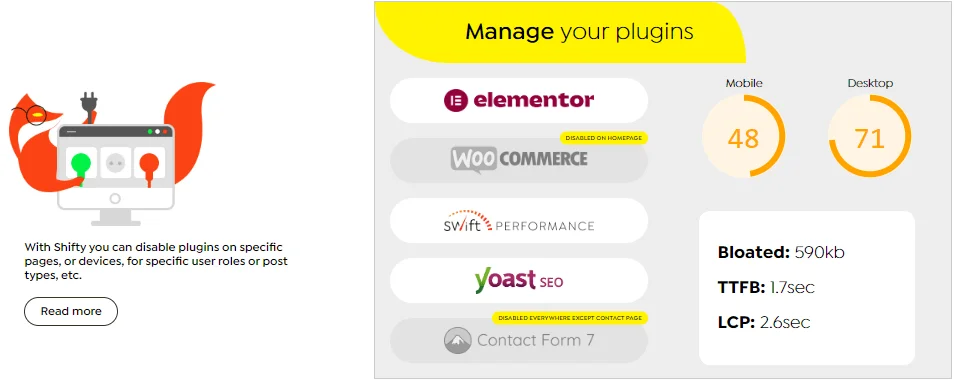
One of WP Shifty’s biggest strengths is its ability to give you total control over plugins. You can disable specific plugins on certain pages, post types, or devices without deactivating them site-wide. For example, if you’re using Elementor only for your homepage or WooCommerce only for your shop pages, you can turn them off everywhere else. This simple change instantly reduces load time and saves valuable server resources.
The best part? You don’t need to touch any code. Everything is managed visually from an intuitive dashboard, making plugin control effortless — even for beginners. It’s a great way to eliminate unnecessary code execution and ensure your pages only load what’s truly needed.
Over time, your WordPress site collects unwanted scripts and styles that slow down performance. WP Shifty lets you identify and disable specific CSS or JavaScript files that cause bloat. By doing this, it significantly reduces page size and improves your site’s loading speed.
This feature is especially useful when you have plugins that inject unnecessary files into every page. With Shifty, you can turn those off in one click, optimizing your frontend performance and enhancing your Core Web Vitals score.
Sometimes, you don’t need to remove a file — you just need to modify it. WP Shifty lets you overwrite CSS and JS files on a per-page or per-device basis. That means you can tweak or remove unused code without affecting your entire website.
This flexibility helps you create lighter, faster, and more custom experiences for visitors. You can clean up messy stylesheets or fine-tune scripts — all through a user-friendly interface.
If you love customization, you’ll appreciate WP Shifty’s ability to inject custom HTML, CSS, or JavaScript. You can add your tracking codes, pop-ups, banners, or other custom elements to any page — without editing your theme files.
This makes adding extra functionality quick, safe, and easy. Whether it’s embedding analytics snippets or styling individual pages, you stay in control without touching your site’s core code.
Preloading important assets can make a huge difference in loading speed, and WP Shifty makes this simple. You can preload CSS, JS, images, fonts, and even videos to ensure critical resources are fetched early by browsers.
This not only improves your First Contentful Paint (FCP) and Largest Contentful Paint (LCP) metrics but also ensures your site feels faster to users. WP Shifty helps you achieve 90+ PageSpeed scores on both mobile and desktop effortlessly.
WP Shifty directly improves your Core Web Vitals by optimizing what loads and when. By disabling unnecessary assets and preloading critical ones, it enhances metrics like LCP, TTFB, and CLS.
The results are clear: faster interactivity, smoother scrolling, and improved overall site health. Better Web Vitals also mean better SEO performance, helping your site rank higher and retain visitors.
Not every user needs the same experience. With WP Shifty, you can control which plugins load based on user roles (like admin, editor, or subscriber) or device types (desktop, tablet, or mobile).
This fine-grained control lets you create a lightweight experience for visitors while keeping advanced tools available for logged-in users or admins. It’s the perfect balance between functionality and speed.
Many plugins add global CSS and JS that your site doesn’t always need. WP Shifty helps you disable those unused files with just a few clicks. By keeping only the essential assets, you can dramatically cut down file sizes and boost page load times.
This simple optimization step keeps your website cleaner, faster, and more efficient without breaking design or functionality.
When you remove bloat and preload assets strategically, your Google PageSpeed scores automatically improve. WP Shifty’s optimization tools help your site hit those green performance bars — both on mobile and desktop.
The visual improvements in load times are immediate, and you’ll also notice fewer performance warnings from Google’s Lighthouse reports.
Finally, WP Shifty helps reduce the Time to First Byte (TTFB) by cutting down unnecessary server requests. Fewer scripts and smaller pages mean your server can respond faster.
This results in quicker load times, less strain on hosting resources, and a smoother experience for visitors — especially on shared or low-resource hosting environments.
No — WP Shifty isn’t a cache plugin, and that’s actually one of the things that makes it stand out. While traditional caching plugins store static versions of your pages to speed up load times, WP Shifty works on a deeper level — it focuses on reducing bloat and optimizing resource usage before caching even comes into play. It helps you disable unnecessary plugins, CSS, and JavaScript on pages where they’re not needed, making your site lighter and faster at the source.
In other words, caching only hides inefficiency, while WP Shifty fixes it. However, the best part is that WP Shifty plays well with cache plugins. You can use it alongside tools like Swift Performance, WP Rocket, or LiteSpeed Cache to maximize your site’s performance. Shifty ensures that only the essential code is delivered to your caching plugin, resulting in smaller cached files and faster page delivery.
So while WP Shifty isn’t a cache plugin itself, it’s the perfect companion to one — handling the optimization side of things so your cache plugin can focus on delivering blazing-fast pages.
Yes — WP Shifty is designed with simplicity in mind, making it easy to use even if you’re not a developer. Its clean, visual interface allows you to manage plugins, disable unused CSS or JavaScript, and optimize pages without touching a single line of code.
Each feature, from managing plugin load to preloading assets, is clearly labeled and intuitive, so you can make powerful optimizations with just a few clicks. If you already know how to install and configure WordPress plugins, you’ll find Shifty’s workflow surprisingly straightforward.
That said, WP Shifty is a professional-grade optimization tool, which means it’s most effective when used by someone who understands the basics of WordPress performance and site structure. You don’t need to be a tech expert — but having a general idea of what scripts and plugins do will help you make the most of it.
Think of it like having a “performance control panel” for your website: it’s powerful and easy to use, but a bit of foundational knowledge ensures you don’t disable something important. For users who enjoy experimenting and want more control over their site’s speed, WP Shifty strikes the perfect balance between beginner-friendliness and pro-level power.
WP Shifty offers the best and cheapest pricing plans with great features and is also packed with a 14-day money-back guarantee.
| Single | Small | Developer | Unlimited | ||||||
|---|---|---|---|---|---|---|---|---|---|
| €39.99 per year | €79.99 per year | €124.99 per year | €299.99 per year | ||||||
|
|
|
| ||||||
| Get Started | |||||||||
You don’t need a cache plugin to benefit from WP Shifty — it can speed up even uncached pages by removing unnecessary bloat and optimizing scripts. However, for the best results, it’s recommended to use a caching plugin alongside WP Shifty. This combo helps your site load faster, reduces server load, and delivers a smoother browsing experience overall.
Most cleanup plugins offer only basic options, like disabling scripts or plugins site-wide. WP Shifty takes it several steps further by letting you create complex rulesets — or “scenarios” — that define exactly when and where optimizations should apply. You can combine multiple conditions, like device type or user role, and even set exceptions for complete flexibility.
Absolutely! WP Shifty comes with a 14-day money-back guarantee, so you can try it out completely risk-free. If you decide it’s not for you — or it doesn’t fit your workflow — you can request a full refund within 14 days of purchase.
(1 User reviews)


(1 User reviews)

Starting Price
$129.00 per year
Starting Price
$39.00 per year
Starting Price
$99.00 per year

Starting Price
$0.00 per year

Starting Price
$14.50 per month

Starting Price
$39.00 per year

Leila
OUTSTANDING
Works Perfectly
24 Apr 2025
Customer support is fast and helpful. The installation was easy, just followed the documentation guide, everything works perfectly.
Reply as brand