

Are you weary of mundane WordPress themes? If so, fret no more. This review presents to you the latest sensation in the WordPress market that has captivated the hearts of theme enthusiasts WP Astra. If you are wondering why this Astra theme is causing such a stir, here is a must-read to unravel the reasons behind the buzz.
WP Astra is a premier WordPress theme celebrated for its unmatched design flexibility. With seamless layout control for headers, blogs, and pages, it offers an intuitive and visually striking user experience. WP Astra is more than a theme; it's a powerhouse for crafting exceptional, user-centric websites.

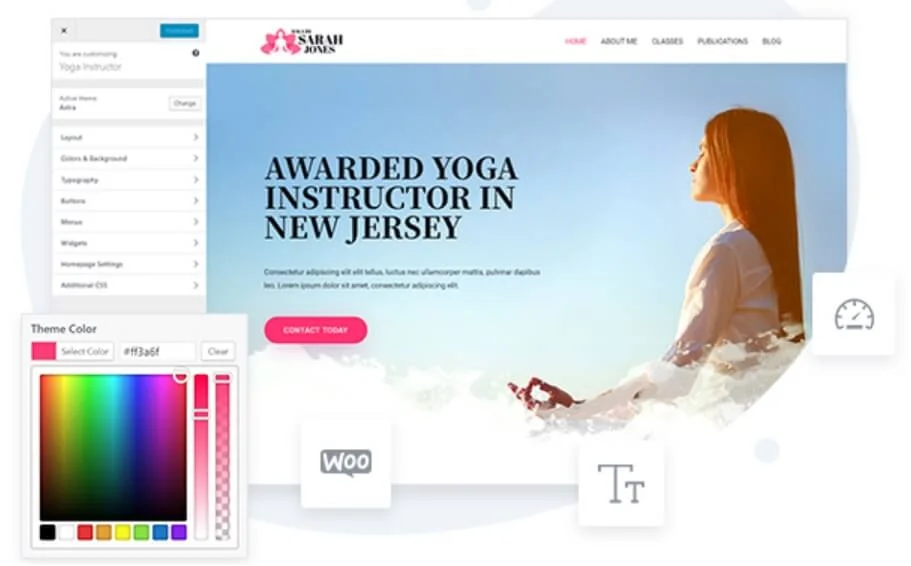
WP Astra, a standout WordPress theme, offers a user-friendly customization experience for creating a fast and visually appealing website. Its intuitive visual customizer eliminates the need for extensive coding, making achieving the desired look quick and easy.
With detailed customization capabilities, WP Astra provides seamless control over various website elements through Layout Settings. Users can fine-tune the container layout, header, blog, archives, single pages, posts, sidebar, and footer to meet specific requirements.
The Header Options include built-in layouts, with the Pro addon expanding possibilities by introducing additional features. It allows users to create a unique, engaging header design that complements their website's aesthetic.
Going beyond appearance, WP Astra simplifies the adjustment of colors and typography, recognizing the importance of brand integration. Users can easily set fonts and colors that align seamlessly with their brand identity.
Extending customization to the content level, WP Astra's customizer options cover blog posts and archive pages. Users can effortlessly control elements such as width, content, and metadata, ensuring a cohesive and personalized presentation.
Check Out the Best Templates from WP Astra Theme

How to Set Up the Astra Theme - A Technical Guide?
Quick Installation of Astra Theme: Installing the Astra theme on your WordPress website is straightforward. Begin by logging into your WordPress Dashboard and navigating to Appearance and then Themes. Click on Add New, type Astra in the search box, and hit Enter. Locate the Astra theme, click Install, and once installed, activate it.
Manual Installation (if needed): If you prefer a manual approach, download the Astra theme from the official website. In your WordPress Dashboard, go to Themes, select Add New, choose Upload Theme, and either upload the Astra file or use FTP to transfer it.
Astra Child Theme: Understanding the purpose of a Child Theme is essential. Think of it as a layer around the Astra theme, storing customizations without impacting performance. To use it, install both the Astra (parent) theme and the Child Theme. Activate both, ensuring that your changes are preserved during Astra theme updates.
Switching to Astra Theme: Considering a switch to Astra? It's an easy process, especially if your website uses Gutenberg, Elementor, Beaver Builder, or Brizy. Before transitioning, check compatibility tips and ensure a smooth switch without losing your design or content.
Astra Key Features: What makes Astra Best?
Effortless Design with Pre-Built Templates:
You can maximize the potential of WordPress designs by utilizing WP Astra's impressive array of pre-built website templates, which enables users to reduce design time significantly.

Whether you are a beginner or an experienced developer, the user-friendly nature of these pre-made templates guarantees a swift and visually stunning setup. WP Astra is the top pick for anyone who values efficiency without sacrificing design excellence.
Seamless Customization Without the Need for Code:
WP Astra's key strength is its user-friendly customization options. With an intuitive interface in the WordPress Customizer, you can effortlessly modify the design without any coding knowledge. This feature empowers users to create a distinctive and personalized look for their website, offering a high level of customization flexibility.
Page Builder Compatibility for Design Freedom:
WP Astra's compatibility with popular page builders is a blessing for those who crave design freedom. The theme allows users to toggle off page titles and sidebars, providing the canvas for full-width pages and unrestricted creativity.
The seamless integration with page builders empowers users to bring their design visions to life effortlessly, allowing for creative expression without constraints. WP Astra stands out as an ideal choice for those who prioritize freedom and creativity in their website projects.
Seamless Layout Management:
Astra provides unparalleled control over your website's layout, allowing for meticulous customization of headers, blogs, single pages, and posts. The theme's intuitive design options ensure a seamless and visually appealing user experience.
Mega Menus for Creative Navigation:
Astra unleashes creativity with mega menus, enabling the creation of visually stunning templates. Whether using a favorite page builder or integrating shortcodes, these menus elevate website navigation, providing an engaging and intuitive experience.
Dedicated Sidebars for Versatility:
You can experience unparalleled versatility with Astra's dedicated sidebars, enabling you to customize the website's sidebars for specific pages. This feature overrides default settings, allowing for a personalized touch that enhances functionality and aesthetics.
Header and Footer Excellence:
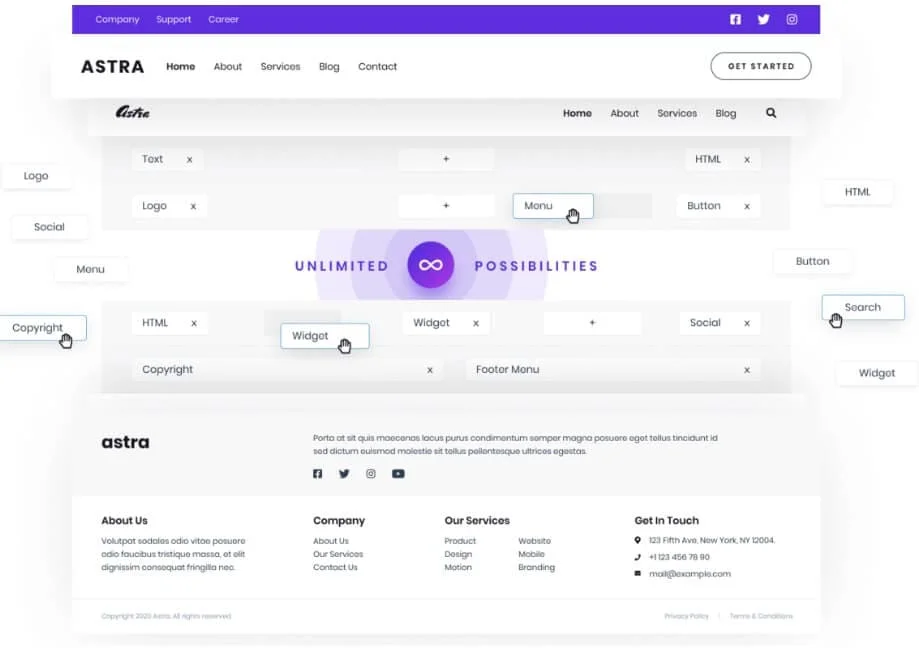
You can use many inbuilt header and footer options with Astra, extending possibilities further with the Astra Pro addon. These options ensure that your website's header and footer serve their functional purpose and contribute to an aesthetically pleasing design.
WooCommerce Support:
WP Astra emphasizes the importance of fast and secure WooCommerce themes to enhance your online sales. Astra's WooCommerce module offers customizable grid settings, allowing you to showcase your products according to your preferences.

Astra offers an off-canvas sidebar option triggered by a button or link, gallery customization with grid or list layouts, a sales bubble style feature for enhanced visibility and quick purchases, an infinite scroll option for displaying all products on a single page, a quick view feature, and a Woo Commerce-compatible drop-down cart for convenient user interaction.
Explore Astra Services & Plans
Astra Plans
| Astra Pro | Essential Toolkit | Business Toolkit |
|---|---|---|
| $49.00 per year | $79.00 per year | $149.00 per year |
| Everything in Astra Pro, and:
| Everything in Essential Toolkit, and:
|
Conclusion
WP Astra emerges as a standout choice in the extensive world of WordPress themes. Valued for its remarkable attributes, WP Astra is used for being fast, lightweight, and highly customizable. WP Astra isn't just a theme; it's a revolution in a sea of ordinary designs.
Breaking free from the usual, it provides a liberating experience for those valuing innovation and top-notch aesthetics in their websites. Recognized as one of the most popular themes, WP Astra's distinction lies in its commitment to redefining WordPress standards. You can elevate your online presence with a WP Astra theme that surpasses expectations.